
User provisioning via SCIM 2.0 (Entra ID, Okta): how it works
SCIM 2.0 (System for Cross-domain Identity Management) is the standard provisioning protocol: your identity provider creates, updates and deactivates employees in UnSpot itself. Microsoft Entra ID, Okta, OneLogin and any other directory with SCIM 2.0 support work this way. This article explains how the exchange works: who initiates it, what the issued token grants, and what is accepted and stored on the UnSpot side. It is written for the information security team reviewing the integration. For setup steps, see Set up user provisioning via SCIM 2.0 (Entra ID, Okta).
What SCIM provisioning is
With a SCIM connection your directory remains the source of truth: the identity provider sends changes to UnSpot over a secured connection with a secret token. New employees appear in UnSpot automatically, profile changes are picked up, leavers are deactivated, and groups and the organizational structure are kept current.
You switch it on in Manage > Integrations > Synchronisations, the SCIM 2.0 card. The roles that may configure integrations are Super Administrator and Integrations Administrator.
The difference from direct connections is fundamental. With AD LDAP, Entra ID through Graph API or Google Workspace, UnSpot is the initiator: it calls your directory and holds access to it. Here it is the other way around — your directory calls UnSpot, and an UnSpot secret goes outside. This is not a “safer” option but a different risk profile: instead of access to your network there is a long-lived key that reads and writes the employee directory.
Who connects to whom
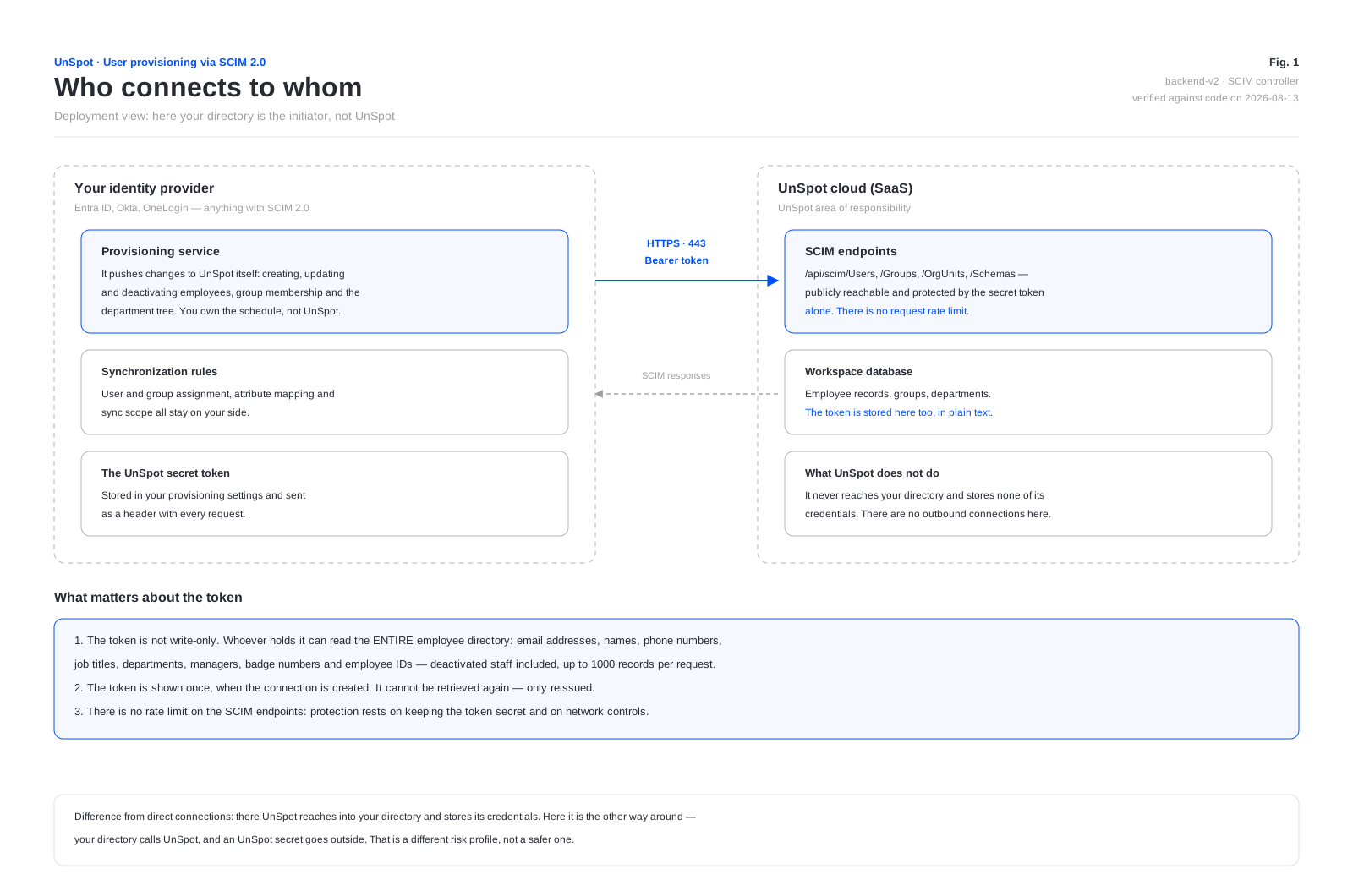
SCIM works independently of the other synchronization methods: unlike the direct connections, which exclude one another, provisioning can be switched on alongside any of them. That is technically possible but means two sources of truth for one directory — not something to do on purpose.
What the secret token grants
This is the key point for a review, and it is often misread. The token is issued so that the directory can create employees, but the rights that come with it are wider.
| What the token can do | Details |
|---|---|
| Read the entire employee directory | A list request returns every user of the workspace, deactivated ones included, up to 1000 records per request. The response carries the email address, first and last name, position, phone, department, the name and identifier of the manager, the UnSpot role, the badge number, the employee ID, the activity flag, the attendance rate and the work mode (workMode, read-only) |
| Create, change and delete employees | The standard SCIM operations on users |
| Create, change and delete groups | Including replacing group membership wholesale |
| Replace the organizational structure tree | In a single operation, in full — see the section below |
| Upload employee photos | JPEG and PNG, up to 100 KB |
In other words, a SCIM connection is not a write-only operation. A leaked token means a leaked employee directory with personal data, plus the ability to change the workspace user list at scale. Compensating controls: keep the token in the protected settings store of your directory, set a finite validity period and reissue it on a schedule.
The token is stored in the workspace database in plain text — neither hashed nor encrypted. It cannot be retrieved again through the interface: it is shown once, when the connection is created.
Token lifecycle
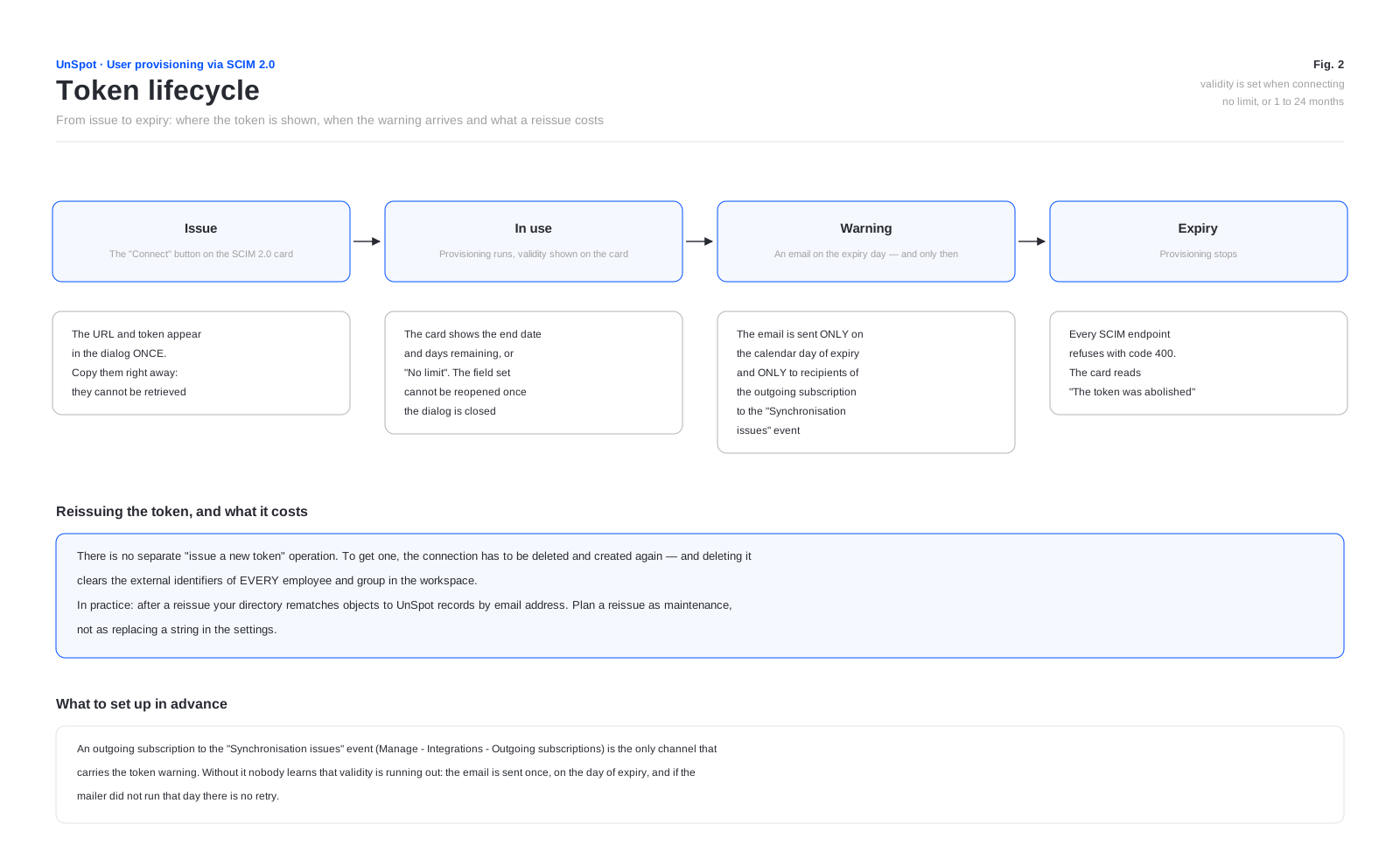
Validity is set when connecting: No limit or from 1 to 24 months. The SCIM 2.0 card shows the token termination date and how many days remain, or reads No Limit.
The expiry warning does not work the way people usually expect. The email is sent only on the last working day of the token — the token still works through that day, and the email names the date from which it stops being accepted — once, and only to the recipients of the outgoing subscription to the “Synchronisation issues” event (Manage > Integrations > Outgoing webhooks). If no such subscription exists, nobody learns that the deadline is coming. There is no week-ahead or month-ahead notice, and if the mailer did not run that day there is no retry.
After expiry every SCIM endpoint refuses, provisioning stops, and the card reads that the token was abolished.
Reissuing the token costs more than it looks. There is no separate “issue a new token” operation: the connection has to be deleted and created again. Deleting the connection clears the external identifiers of every employee and every group in the workspace, so after a reissue your directory matches objects to UnSpot records again by email address. Plan a reissue as maintenance, not as replacing a string in the settings.
What is sent to UnSpot
Your directory decides what is sent: UnSpot accepts what it is given, within the supported attribute set.
| SCIM attribute | UnSpot field | Required |
|---|---|---|
userName | Email address, which is also the login | required |
name.givenName | First name | required |
name.familyName | Last name | required |
displayName | Display name | optional, up to 255 characters; accepted since 7 September 2026 |
externalId | External identifier of the record | optional, up to 36 characters, unique |
title | Position | optional |
phoneNumbers with type work | Phone | optional; another type is rejected |
active | Employee active flag | optional, active by default |
enterprise extension, department | Department in the organizational structure | optional |
enterprise extension, manager.value | Manager | optional; looked up by identifier or email address, an error if not found |
UnSpot extension, role | Role in UnSpot | optional |
UnSpot extension, numberPass | Access control system (PACS) badge number | optional |
UnSpot extension, employeeId | Employee ID | optional |
UnSpot extension, orgUnit | Department; takes precedence over department | optional |
UnSpot extension, attendance | Office attendance rate — an integer from 0 to 100 | optional |
The personal data UnSpot accepts and stores: last and first name, email address, phone, position, department, the link to a manager, the PACS badge number and the employee ID. You decide the set on the directory side — UnSpot requires nothing beyond the email address, first name and last name.
What is not accepted or stored
- Passwords. The
passwordattribute is never read from the request. The UnSpot sign-in password is generated randomly on the UnSpot side. - The
emailsarray. The address comes fromuserNameonly; values passed inemailsare ignored. - Other standard SCIM attributes — locale, time zone, addresses, profile photos, certificates — are not supported and are dropped silently, without an error. Display name is no longer on that list:
displayNamehas been accepted since 7 September 2026 and is written to the field of the same name in the employee record. - The display name arrives with no checkbox in the interface. Unlike the AD LDAP, OpenLDAP and Entra ID syncs, where the display name is enabled by a checkbox of its own, over SCIM the attribute is always accepted as soon as your directory starts sending it. For the full behaviour see “External API: User sync via SCIM”: an empty value is stored as
null, changes to the first and last name never touch the display name, and a PUT without the attribute keeps the previous value. - There is no return flow into your directory. UnSpot initiates no outbound connection as part of this integration.
Direction and initiator of the exchange
The exchange is one-way by initiative: your directory calls UnSpot, over inbound requests on a secured connection. UnSpot never calls your directory and stores none of its credentials.
On the customer side you need outbound firewall rules: the provisioning service of your directory has to reach the address of your UnSpot workspace. If the directory is cloud-based (Entra ID, Okta), the requests come from the provider cloud and no rules on your perimeter are needed at all.
Protocol, authentication and limits
| Parameter | Value |
|---|---|
| Address | In the form https://your-domain.unspot.com/api/scim — issued on connection |
| Protocol | HTTPS. The address is always built with the HTTPS scheme |
| Authentication | The secret token in a Bearer header. The scheme check is case-sensitive |
| Body format | Write operations require Content-Type: application/scim+json. With application/json the request is rejected |
| Missing or wrong token | Refused with code 401 |
| Expired token | Refused with code 400, not 401 — a common source of misdiagnosis on the directory side |
| Request rate limit | None. A limit applies only to replacing the organizational structure — at most once an hour |
The SCIM endpoints sit outside the general application authentication and are reachable on the network: the only protection is the secrecy of the token. Compensating controls on your side: a finite validity period, scheduled reissue and, if your provider supports it, restricting the outbound addresses of the provisioning service.
Organizational structure
The department tree is uploaded in a single operation. Nesting is supported: the path is split on the / character, intermediate nodes are created automatically, and a department can carry a description and the email address of its head.
This is a full replacement of the tree, not an addition. Nodes that were created by the synchronization and are missing from the set you send are deleted together with the whole branch. Sending an incomplete tree will delete the missing departments in UnSpot.
The operation is limited to one call per hour per workspace: an earlier repeat is rejected. Sets larger than 500 items — or any set once the synchronized tree in UnSpot exceeds 500 units — are processed asynchronously — the response comes back immediately while the tree is rebuilt in the background.
What happens on deactivation and deletion
| What the directory does | What happens in UnSpot |
|---|---|
Marks an employee inactive (active: false) | Deactivation. Bookings are cancelled, sessions and access tokens, calendars and locker cell bookings are removed, assigned desks, parking and delegate rights are released |
| Deletes an employee | Archiving — if the employee has no record from another synchronization. On top of the above, the external identifier and the manager link are cleared and the employee is removed from every group, team and favourites list. The record itself is not deleted. One exception: if the employee personal calendar is connected to a meeting room, the delete request is rejected until the calendar is disconnected |
| Deletes a group | The group is deleted. A system group cannot be deleted |
| Replaces group membership | Membership is set to what was sent. Members are addressed by UnSpot identifiers, not by the external identifiers of your directory |
One more specific behaviour: an attempt to deactivate an employee who holds the Super Administrator role in UnSpot through SCIM is silently ignored — the operation succeeds but nothing changes; activating a Super Administrator through SCIM is ignored the same way. Other administrator roles (integrations, offices, users) are deactivated by SCIM like regular employees. Super Administrators are deactivated by hand in UnSpot.
Logs and audit
- Write operations are logged: the operation type, the workspace subdomain and the object identifier. Personal data values and the token are never written to the log — on a validation error only the field names are recorded.
- Read operations are not logged at all. A request for the employee list leaves no trace — worth weighing when assessing the impact of a leaked token.
- Employee changes appear in the User management history report (Analytics > Reports) with a SCIM marker on the initiator. The report stores the name and email address of the affected employee, the action and the list of changed fields; it is retained for a year.
- Connecting, changing and disconnecting SCIM do not appear in the History of Integration Management report — that report is filled by other events.
One blind spot: deleting an employee who has a cloud-synchronization record deactivates them through SCIM without a User management history entry — the internal deactivation event is not picked up by the business log. Deactivation via active: false does reach the report — as a record update.
What to weigh during your review
- UnSpot gains no access to your network and stores none of your directory credentials — the main advantage of this method.
- In exchange, a token that reads the whole employee directory with personal data, and gives full control over the workspace user list, is handed outside.
- The token is stored in the UnSpot database in plain text, there is no request rate limit on the endpoints, and read operations are not logged.
- The expiry warning arrives only on the day of expiry and only to subscribers of the “Synchronisation issues” event — the subscription has to be set up in advance.
- Reissuing the token clears the external identifiers of every employee and group.
- Replacing the organizational structure deletes departments missing from the set, together with their branch.
- The synchronization rules stay in your directory — user assignment, attribute mapping and sync scope are outside UnSpot control.
The token can assign roles. The role extension accepts every UnSpot role, including Super Administrator — UnSpot imposes no restriction. Keep that in mind when deciding who configures provisioning on the provider side.
