
Product updates
06-10-2026
PACS analytics, now office by office
Many companies run several offices, but collect entry events through a single access control system: one PACS server for every building, or one integration for the whole city. Until now, in this setup UnSpot knew that an employee had come to work, but not where. That skewed PACS-based analytics: you picked a specific office, and the visits count still included entries to every building at once.
The access point tells the office
Every PACS event arrives with the name of an access point — a turnstile, a lobby gate, a door on a floor. Incoming webhooks in JSON format now have an Office PACS access point mapping block: the administrator picks an office and lists its access points. Using this mapping, UnSpot determines which office the employee entered and stores the office with the event — it shows up in the History of Office Visits (ACS) report.
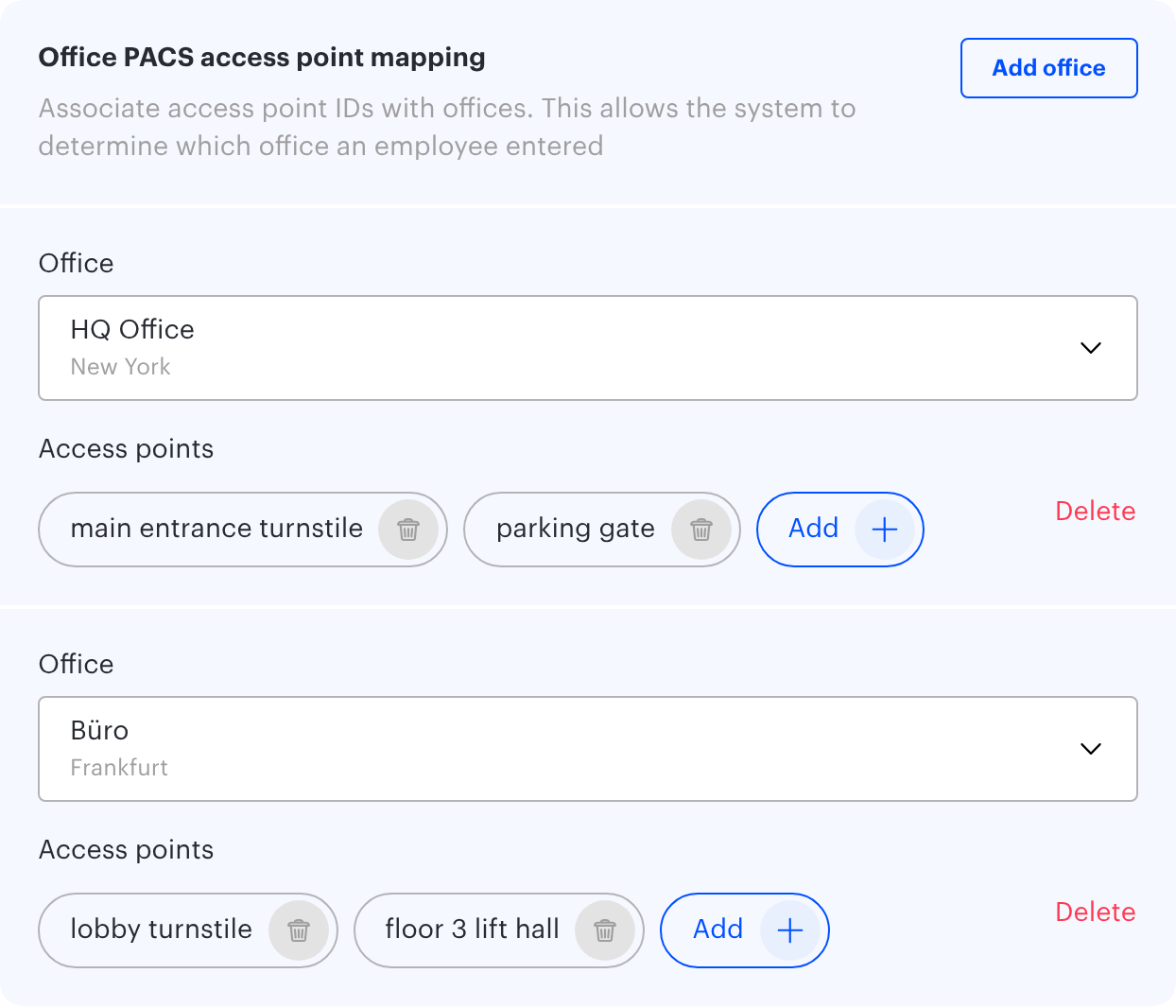
A webhook can map any number of offices, with up to one hundred access points each. The same access point cannot belong to two offices, so there is no ambiguity. If an event comes from an access point that is not on the list, it is still saved — just without an office.
Office analytics that is really about the office
The office filter in the By office and By desks analytics now applies not only to workplaces, but to the entries themselves. Select your Frankfurt office and you see entries to that office, not to every building the company has. With no office selected, the charts are built exactly as before.
When you load PACS data from a file (the Upload PACS data button in By office), the office is determined the same way: in the UnSpot format it comes from the office name column, in other supported formats — from the access point.
How to start
The mapping lives in Integrations → Incoming webhooks: open an existing webhook or create a new one, add offices with Add office and enter the access points exactly as your PACS names them. From then on, new events are linked to offices.
What you get
Analytics shows the real attendance of each site, not a company-wide picture. You can compare offices, see which one is underused and where desks run short, and make decisions on leases and seating based on actual numbers — even if a single PACS serves all your buildings.
22-09-2026
Call people what your company calls them
In any sufficiently large company, the names in the systems and the names in real life are two different sets. The directory says “Kathryn E. Whitmore”; everyone calls her Kate. Someone’s corporate account is a transliteration nobody recognises. There are two Alex Petersons in the same department, and the only way to tell them apart is an employee number nobody remembers.
Until now UnSpot showed whatever came from the directory: first name and last name. On the office map, on the displays outside meeting rooms, in the “Who is in the office” list — everywhere.
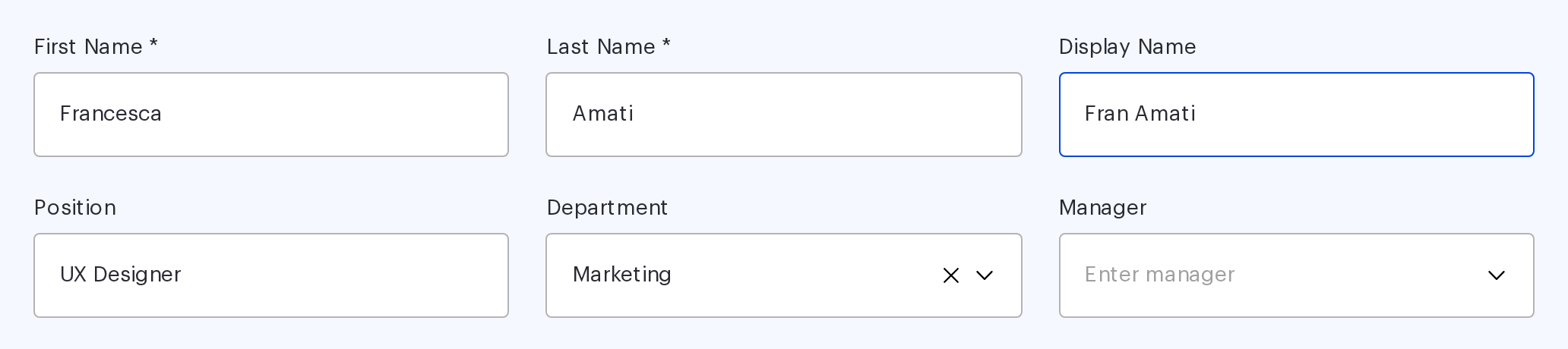
The Display Name field
Employees now have a field of their own: Display Name. When it is filled in, that is what the interface shows — on the Users and Displays pages, in tooltips on the office map, in meeting rooms and lockers, in the “Who is in the office” sidebar, in the user card and on the screens by the rooms.
When the field is empty, everything looks as it did before — first name and last name. You do not have to configure anything to keep things as they were.
Why an office cares
First, recognition. A booking on the map is labelled the way colleagues actually refer to the person, not the way HR entered them. That sounds minor right up to the moment you are looking for a free desk next to someone specific.
Second, namesakes. Two Alex Petersons become “Alex Peterson (Marketing)” and “Alexander Peterson”, and the “which one?” question disappears.
Third, displays. On a screen outside a meeting room the name is read from a distance and in passing: three words with a middle initial read worse than two familiar ones.
Search understands it too
Display Name takes part in user search and in global search alongside the other fields. You can find a colleague by the name you actually use for them rather than by the official one.
And you do not have to fill the field in by hand for the whole company: it can be synchronised from your corporate directory together with the rest of the employee record.
A small thing everybody notices
Display Name is the kind of change that never makes it into a slide deck but gets noticed on day one. Someone opens the office map and sees the team the way they know it: colleagues rather than an export from a personnel system.
There is one limit — 255 characters, which covers any sensible form of a name. And when an employee’s personal data is deleted, the field is cleared along with the first and last name, so it needs no separate attention.
22-09-2026
A taken locker is nobody else's business
A locker holds personal things: gym kit, medication, chargers, a present you would rather not carry across town. It is also an object in a booking system where, by default, everyone can see who took it.
In an open-plan office that is more visible than it sounds. You can see who keeps a cell for months, who took a second one, who books nothing at all. There is nothing sinister about it — but attention to those details appears by itself, and people start to feel watched.

The Private bookings setting
Lockers now have a privacy setting of their own. It is switched on in the booking rules of a specific locker and is off by default, so existing lockers keep working as before.
With privacy on, exactly one thing changes. Taken cells are still shown as taken — planning around a locker works just as it did. What is hidden is the owner: the name and avatar disappear, and the tooltip simply says the cell is occupied.
One important exception: employees always see their own bookings, and managers see their team’s. Privacy closes the casual glance, not the managerial one.
Configured per locker
Privacy is set on an individual locker rather than company-wide, and that matters. A locker in the lobby and a locker in the changing room are different stories: in the first, transparency helps; in the second, it gets in the way.
Lockers with privacy enabled are marked with an indicator in the space list, so an administrator does not have to open each one to see where the mode is on.
The same principle as desks and rooms
If the wording feels familiar, it should. Private bookings already work exactly this way for desks and meeting rooms: occupancy is public, personal data is not.
Lockers were the one resource left out of that rule. Not any more.
When it unblocks a rollout
Locker privacy usually comes up not as a wish from employees but as an objection during rollout: “is it really fine that everyone can see who uses what?” Until now there was no good answer.
Now there is one, and it does not mean giving up on measurement: the company still sees locker utilisation in analytics and knows how many cells are taken and how many are free. Exactly one thing is hidden — somebody else’s name on somebody else’s cell.
22-09-2026
Locker news by email, not by walking the aisles
Ask an office manager how many locker cells are currently taken for no good reason. Most will honestly say they have no idea: finding out means going to look, then matching what you saw against who is assigned where. So nobody finds out — until the first complaint that there is nothing free.
The data was in the system all along. What was missing was a way to learn about it without going into the system on purpose.
Two new locker events
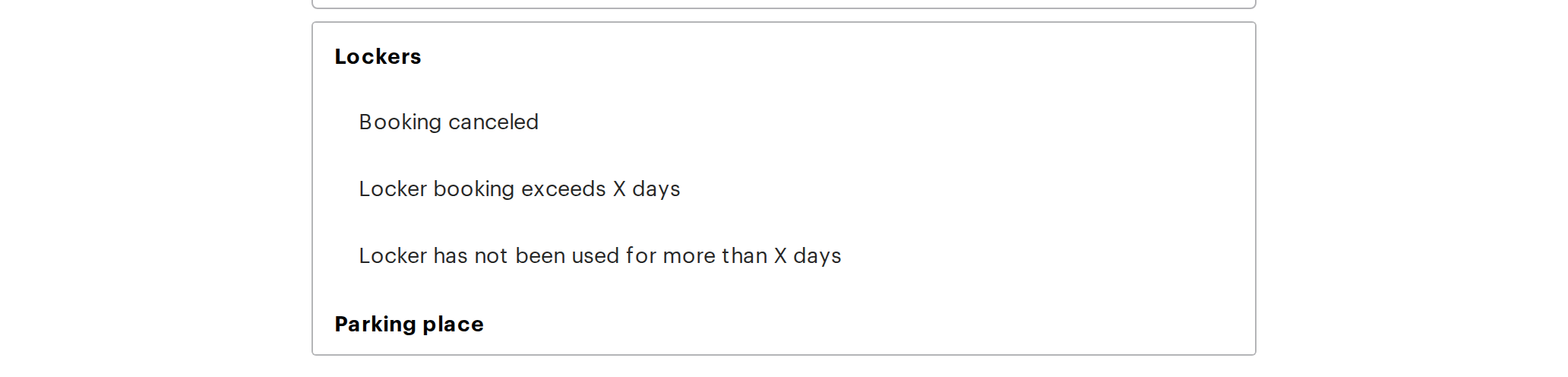
Integrations → Outgoing webhooks now offers two new events, both about storage cells.
Booking canceled fires when a booking is released automatically by the Booking horizon policy. The email goes out on the day of cancellation, so whoever is responsible knows immediately that a cell is free — and can offer it to the person waiting instead of waiting to be asked.
Locker booking exceeds X days covers the opposite case. You set a number of days, and once a day you receive an email listing every cell held longer than that, with a link to each locker so you do not have to search.
Why the second one matters more than it looks
Not everyone switches the booking horizon on. In many companies, automatically cancelling someone’s booking is too blunt: people use lockers differently, and a hard rule punishes the forgetful and the genuinely long-term user alike.
The long-booking subscription solves the same problem more gently. Nothing is cancelled automatically — you simply see where a cell has been sitting untouched. A human decides what to do next: for one person it is a normal working pattern, for another the locker has been occupied since a project that ended last spring.
The recipient is a person, not an address
In both subscriptions the recipient is a UnSpot user rather than an arbitrary mailbox. That looks like a detail right up to the day the responsible person leaves: the emails would keep going nowhere and nobody would notice. Now the subscription is tied to a real person in the system.
Spaces are picked from a list, so one subscription can cover several lockers at once.
22-09-2026
A locker for a while, not forever
Lockers are honest about one thing: there are always fewer of them than there are people. While a company grows, the cells are claimed within a week — and then every office manager knows what happens next. Half of them belong to someone who booked six months ago and has opened the door twice since. A new hire arrives and there is nothing free. So you walk the aisles, cross-check lists, send “please free it up” emails and get silence back.
It is not about people. A locker booking is open-ended by default, and nobody ever revisits something open-ended.
Booking horizon: a deadline that enforces itself
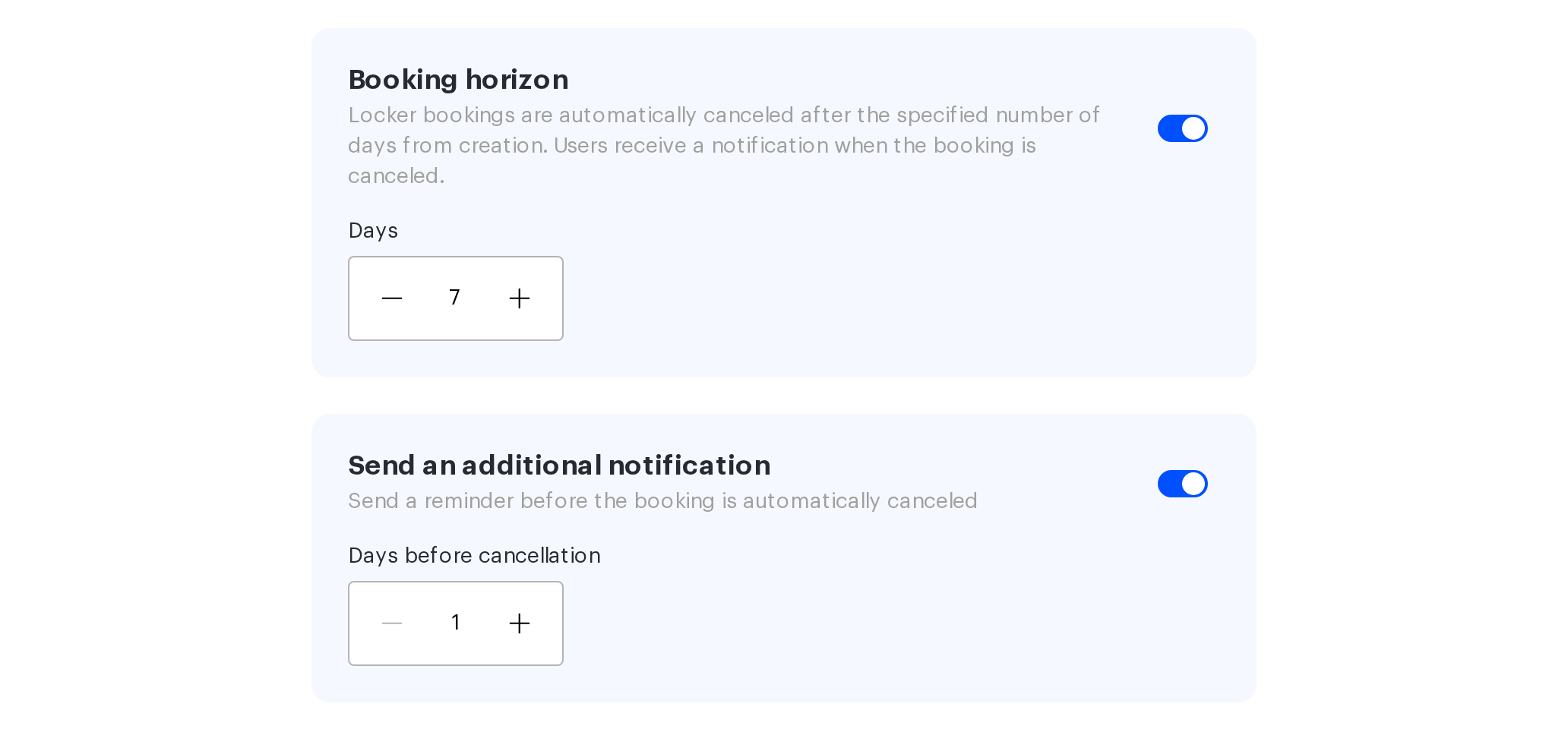
Locker booking rules now include a Booking horizon policy. The administrator sets a number of days, and after that period the booking is released automatically. The setting belongs to each locker separately and is off by default, so existing lockers keep working exactly as before.
The maths is predictable: the day of booking counts as day one, and the countdown follows the time zone of the office the locker belongs to. In a distributed company, cells are freed by local time rather than by headquarters time.
The point is that the cell returns to circulation without anyone’s involvement. No walking the aisles, no reminder emails. What used to be a recurring task for the office manager is now a rule that runs itself.
The warning that makes the rule usable
Automatic cancellation has an unpleasant side, and for a long time it was the reason not to switch the horizon on at all: someone comes for their things and the locker already belongs to somebody else. One such case is enough to disable the policy forever.
That is now avoidable. Next to the horizon there is a Send an additional notification toggle: the administrator sets how many days before cancellation to warn the owner, and the email goes out in advance. The period is 1 to 30 days and has to be shorter than the horizon itself — the system will not let you configure it the other way around.
The email at the moment of cancellation is still there. The difference is that the employee now has time — to extend the booking, collect their things, or claim the cell again.
What changes
A horizon without a warning is a rule that puts you at odds with your colleagues. A horizon with a warning is an agreement: the locker is issued for a period, the period is announced in advance, and after that it goes back to everyone.
Which is why these two settings belong together.