
How to choose a user synchronization method
UnSpot offers seven ways to fill the employee directory, and most companies find that several of them fit. This article helps you choose: how the methods differ, what each one asks of your side, and which limitations only surface after connecting. How each method works is covered in the articles linked from the table; the step-by-step setup lives in their companion Set up articles.
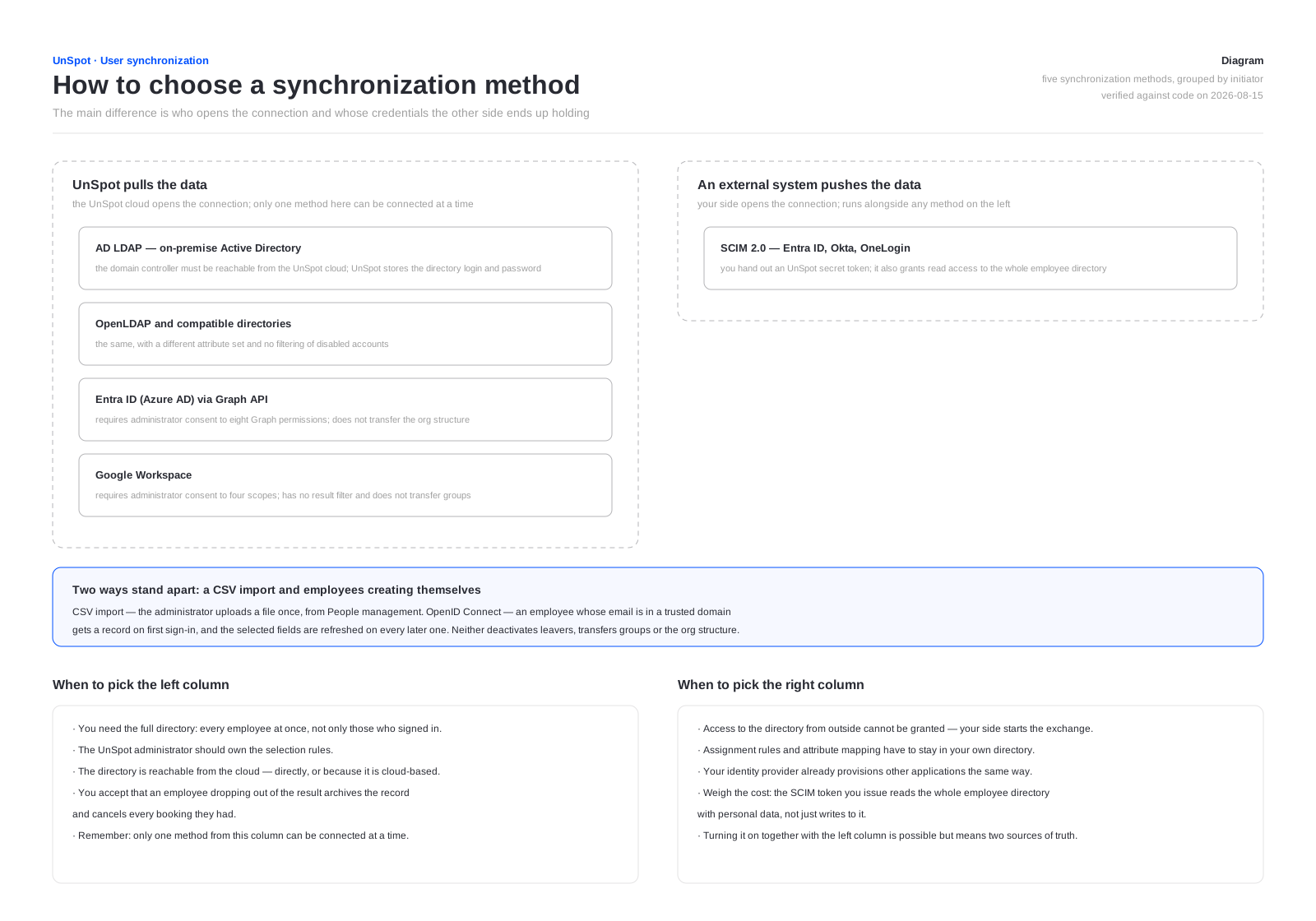
Two classes of solution
The main difference is who opens the connection. Either the UnSpot cloud calls your system and holds access to it, or your system pushes data to UnSpot using a secret token it received. Neither is “safer” than the other — they are different risk profiles, and your information security team weighs them differently.
| UnSpot pulls the data | An external system pushes the data | |
|---|---|---|
| Who initiates the exchange | the UnSpot cloud | your directory or identity provider |
| What goes outside | nothing: UnSpot holds access to your system | an UnSpot secret token — which also grants read access to the whole employee directory; its lifetime is set by the administrator — 1 to 24 months or unlimited — and the expiry warning reaches only the subscribers of the Synchronisation issues event |
| What your network needs | the directory reachable from the cloud (for local directories) | outbound access to your UnSpot workspace address |
| Who owns the selection rules | the UnSpot administrator | the administrator of your directory |
| How many methods at once | only one | runs alongside any method from the left column |
Two ways sit outside this split. A CSV import is a one-off upload done by the administrator, and OpenID Connect lets employees create themselves at first sign-in. Neither is a full synchronization, and neither should be confused with one; both are covered below.
The choice map
Every method in one table
Find the row that matches what you have. If several rows fit, move on to the four questions below.
| What you have | Method | Who initiates | What it transfers | The main limitation |
|---|---|---|---|---|
| On-premise Active Directory | AD LDAP — direct connection | UnSpot | employees, groups, org structure, avatars, badge number | the domain controller must be reachable from the cloud; UnSpot stores the directory login and password |
| OpenLDAP and compatible directories | OpenLDAP — direct connection | UnSpot | employees, groups, org structure, avatars, badge number | the same as AD LDAP, plus no filtering of disabled accounts |
| Microsoft 365, Entra ID | Graph API — direct connection | UnSpot | employees, groups, avatars | does not transfer the org structure; requires administrator consent to eight Graph permissions |
| Microsoft 365, Entra ID | SCIM 2.0 — provisioning from the directory | Entra ID | employees, groups, org structure, avatars, badge number | configured on the Microsoft side; the token you issue reads the whole directory |
| Google Workspace | Google Workspace — direct connection | UnSpot | employees, org structure, avatars | no result filter — the whole directory is transferred; groups are not transferred |
| Okta, OneLogin and other SCIM 2.0 providers | SCIM 2.0 — provisioning from the directory | your directory | employees, groups, org structure, avatars, badge number | rules and attribute mapping stay on your side |
| A file with a list of employees | CSV import — a one-off upload | the administrator | employees, once | a one-off upload: the directory is not kept current afterwards |
| None of the above | OpenID Connect — creation at first sign-in | the employee | the selected record fields | only those who signed in; leavers are not deactivated, no groups or org structure |
The same choice by record fields — what exactly each method can transfer:
| Method | Position | Department / tree | Manager | Phone | Badge number | Photo | Groups |
|---|---|---|---|---|---|---|---|
| AD LDAP | yes | the unit tree | yes | yes | yes | yes | yes |
| OpenLDAP | yes | the unit tree | yes | yes | yes | yes | yes |
| Graph API | yes | the Department field only, no tree | yes | yes | — | yes | yes |
| Google Workspace | yes | the tree or the Department field — mutually exclusive | yes | yes | — | yes | — |
| SCIM 2.0 | yes | the tree and the field | yes | yes | yes | yes | yes |
| CSV import | yes | a path field, creates units | yes | yes | yes | — | links to existing groups only |
| OpenID Connect | yes | a path field, creates units | yes | yes | yes | — | — |
The decisive fact for a PACS integration: only Graph API and Google Workspace do not transfer the badge number.
Four questions that narrow it down
- Do you need the full directory? If every employee has to be in UnSpot from the start and leavers have to be deactivated, you need synchronization. If those who actually sign in are enough, OpenID Connect will do.
- Can the directory be reached from the cloud? If the domain controller cannot be exposed, a direct connection is out and SCIM provisioning is what remains — your identity provider pushes the data, so nothing has to be opened up inbound.
- Who should own the rules? If the selection scope and attribute mapping have to be configured in your own directory, choose SCIM. If managing them in UnSpot is more convenient, choose a direct connection.
- Do you need groups and the org structure? Every connected directory transfers the org structure except Graph API, and groups — except Google Workspace. A CSV import and OpenID Connect do not read a ready-made tree from the source, though the Department field in both creates missing units by the given path (nesting via /). If you need both and your directory is Google, groups will have to be created in UnSpot by hand.
If you have both an on-premise AD and Microsoft 365
This is the most common case: the directory lives in an on-premise Active Directory and a copy of it arrives in Microsoft 365. Three methods then fit, and the choice comes down to two questions: whether the cloud copy holds everything you need, and where the membership rules should live.
| Option | When it beats the others | What to weigh |
|---|---|---|
| AD LDAP directly | The local directory holds attributes the cloud copy does not — the PACS badge number, for example — and the domain controller can be exposed | UnSpot stores the service account login and password, and does not validate the directory server certificate |
| Entra ID via Graph API | The cloud copy is complete and you want it set up in an evening without any network access | It does not transfer the org structure: departments will have to come from the Department field |
| Entra ID via SCIM | Membership management has to stay in Entra ID — application assignment, attribute mapping, sync scope | Setup on the Microsoft side is heavier; the UnSpot token reads the whole directory |
The short rule. If the cloud copy has everything you need, take a cloud option: it needs no access to your network and is quicker to set up. If something is missing there — the badge number is the usual case — the local directory is the only source that has it, and the domain controller then has to be reachable from the cloud.
Creating users at sign-in: OpenID Connect
This method stands apart: it does not pull the directory, it builds it up as people sign in. You configure it under Manage > Integrations > Login options / SSO, the Authorization Rules block, the OpenID Connect card. Creating records does not depend on any particular sign-in provider — every one of them supports it. Refreshing fields on later sign-ins works with fewer of them — see the table.
| Setting | What it does |
|---|---|
| Allow new users plus the trusted corporate domains | An employee whose email belongs to one of the listed domains and who signs in for the first time through any connected sign-in method automatically gets a record in your organization. Domains are lowercased and the leading @ may be omitted |
| Sync user data plus the field list | The selected fields are refreshed on later sign-ins — but only when the employee signs in through an OpenID Connect / OAuth 2.0 connection (AD FS, Keycloak and other manually configured providers); signing in with the pre-built cloud buttons does not refresh fields. Available: First Name and Last Name (always on and cannot be cleared), Position, Department, Manager, Phone, Access Badge Number |
Why it does not replace synchronization. Only those who signed in at least once end up in the directory. Leavers are not deactivated — the record stays active until someone touches it. Groups are not transferred; neither is a ready-made department tree, though the Department field creates missing units. Data is refreshed at sign-in rather than on a schedule, so an employee who rarely signs in keeps a stale record.
When it is enough: a small company on a single corporate domain, where permissions are not handed out through groups and there is no need for a complete directory. When it is not: you need groups in booking policies, the org structure in reports, or a leaver to lose access automatically.
The whole setting is taken apart — what happens at first sign-in, which fields are refreshed on later ones and why they cannot be edited by hand afterwards — in OpenID Connect: creating users at first sign-in.
Sign-in methods themselves — which providers to enable, how to connect SSO through AD FS or Keycloak, how authorization rules and two-factor authentication work — are a separate topic and do not affect which synchronization method you pick.
What to know before you connect
- Only one direct synchronization can be connected at a time. AD LDAP, OpenLDAP, Entra ID and Google Workspace exclude one another: to switch, disconnect the current one first.
- SCIM is the exception. It lives separately and can technically be switched on alongside any direct connection. Doing so is not advisable: the directory would then have two sources of truth.
- An employee dropping out of the result archives their record. Bookings are cancelled, sessions and calendars removed, the assigned desk, parking and delegate rights released. That applies both to narrowing a filter and to an incomplete result from the directory — the mechanics are the same for every method.
- Google Workspace cannot push data itself. Its automated provisioning only works with applications from the Google catalog; an arbitrary SCIM address cannot be entered. If you specifically need a push model, put an identity provider that supports it between Google and UnSpot.
- A manual run exists only for local directories — the Update on-premise AD button (the OpenLDAP card labels it Update on-premise), at most once an hour. Cloud connections have no such button: the exchange runs once a day on the platform schedule.
- The org structure and avatars are not refreshed in the main cycle. Avatars come from a separate job; the department tree is not part of the daily cycle for any method: local directories read it on connection and when the corresponding checkbox is switched on, Google Workspace — only when the checkbox is switched on.
Welcome emails. AD LDAP, OpenLDAP and SCIM 2.0 have a Send welcome emails flag, and the CSV import asks on every upload; the email carries the address and an automatically generated password. With the flag on, the first run mails everyone in the selection — switch it on deliberately. Graph API and Google Workspace send no emails at all: employees they create get access through SSO or password recovery.
What happens to an account blocked at the source. Active Directory filters disabled accounts out at read time, while Entra ID and Google Workspace send a blocked flag — in all three cases the UnSpot record is archived and its bookings are cancelled. OpenLDAP does not tell disabled accounts apart — exclude them with the filter. Over SCIM the provider sends active: false and the record is deactivated. A CSV import and OpenID Connect do nothing about leavers: records stay active until someone touches them by hand.
If something goes wrong
| Symptom | Where to look | |
|---|---|---|
| A message that user synchronization is already connected through another directory service | Another method is connected. Disconnect it, then connect the one you need | |
| Not all employees were pulled in | The result filter, and for local directories the server-side limit on entries per response as well. The missing ones are not merely skipped — they are archived | |
| Some employees lost their bookings | They most likely dropped out of the result and their records were archived. Check the filter and the membership of the groups it names | |
| The org structure is not transferred | Graph API does not have it at all. For the others, check that the checkbox is on and that the mutually exclusive Department option is not selected | |
| Groups are not transferred | Google Workspace has no groups. For the others, switch the groups checkbox on | |
| The department tree is out of date | It is not part of the daily cycle: clear the organizational structure checkbox and select it again | |
| Avatars did not appear | They are refreshed by a separate platform job — wait for its next run | |
| Some employees have an empty manager | The manager is written only if their own record already exists and is active | If the manager reached UnSpot later than their reports, the field fills in on the next cycle; for a CSV import, upload the file a second time |
| Who changed what in the directory | Analytics then Reports, the User management history report: synchronization entries carry the matching marker on the initiator |
Related articles
- User sync with Active Directory (AD LDAP / OpenLDAP): how it works
- User sync with Entra ID (Azure AD) via Graph API: how it works
- User sync with Google Workspace: how it works
- User provisioning via SCIM 2.0 (Entra ID, Okta): how it works
- Importing users from a CSV file
- OpenID Connect: creating users at first sign-in
- UnSpot SCIM API reference
- The direct manager in the employee profile — the Manager field and its synchronisation
- Integrations: overview
