
User sync with Active Directory (AD LDAP / OpenLDAP): how it works
UnSpot can create and update employee records from a local directory — Active Directory or OpenLDAP. This article explains how the exchange works: who initiates it, what leaves the directory for UnSpot and over which channel, where the connection credentials are stored and what never leaves the directory. It is written for the information security team reviewing the integration. For connection and configuration steps, see Set up user sync with Active Directory (AD LDAP / OpenLDAP).
Contents
What this synchronization does
Direction and initiator of the exchange
Protocol, ports and encryption
What is cached and what stays in UnSpot
Network and permission requirements
What happens when an employee disappears from the directory
How OpenLDAP differs from Active Directory
What this synchronization does
The synchronization is one-way: data moves from the directory into UnSpot, and changes made in UnSpot are never written back. You connect it in Manage > Integrations > Synchronisations — the AD LDAP card for Active Directory and the OpenLDAP card for OpenLDAP and compatible directories. The roles that may configure integrations are Super Administrator and Integrations Administrator.
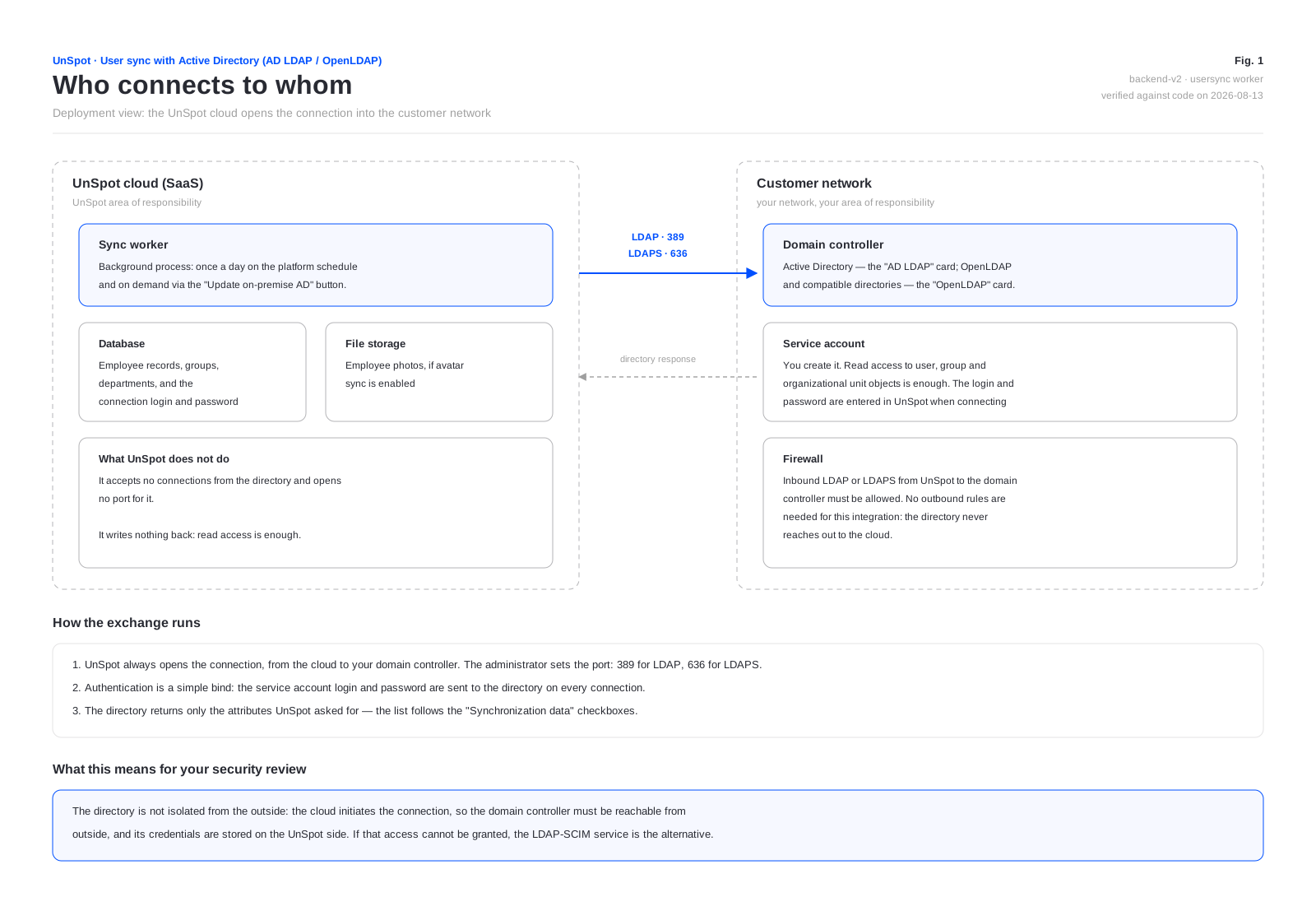
The key difference from an intermediate service: the UnSpot cloud opens the connection to your directory. The directory is therefore not isolated from the outside — the domain controller has to accept inbound connections from UnSpot, and the service account login and password are stored on the UnSpot side. If that access cannot be granted, there is an alternative where the application is installed inside your own network and reaches out on its own — an on-premises LDAP-SCIM connector; ask UnSpot support for its setup guide.
Who connects to whom
Only one user synchronization method can be connected to a workspace at a time: AD LDAP, OpenLDAP, Entra ID or Google Workspace. Connecting a second one fails with the message that user synchronization is already connected through another directory service. SCIM provisioning is the exception — it lives separately and can run alongside any of them.
How one cycle runs
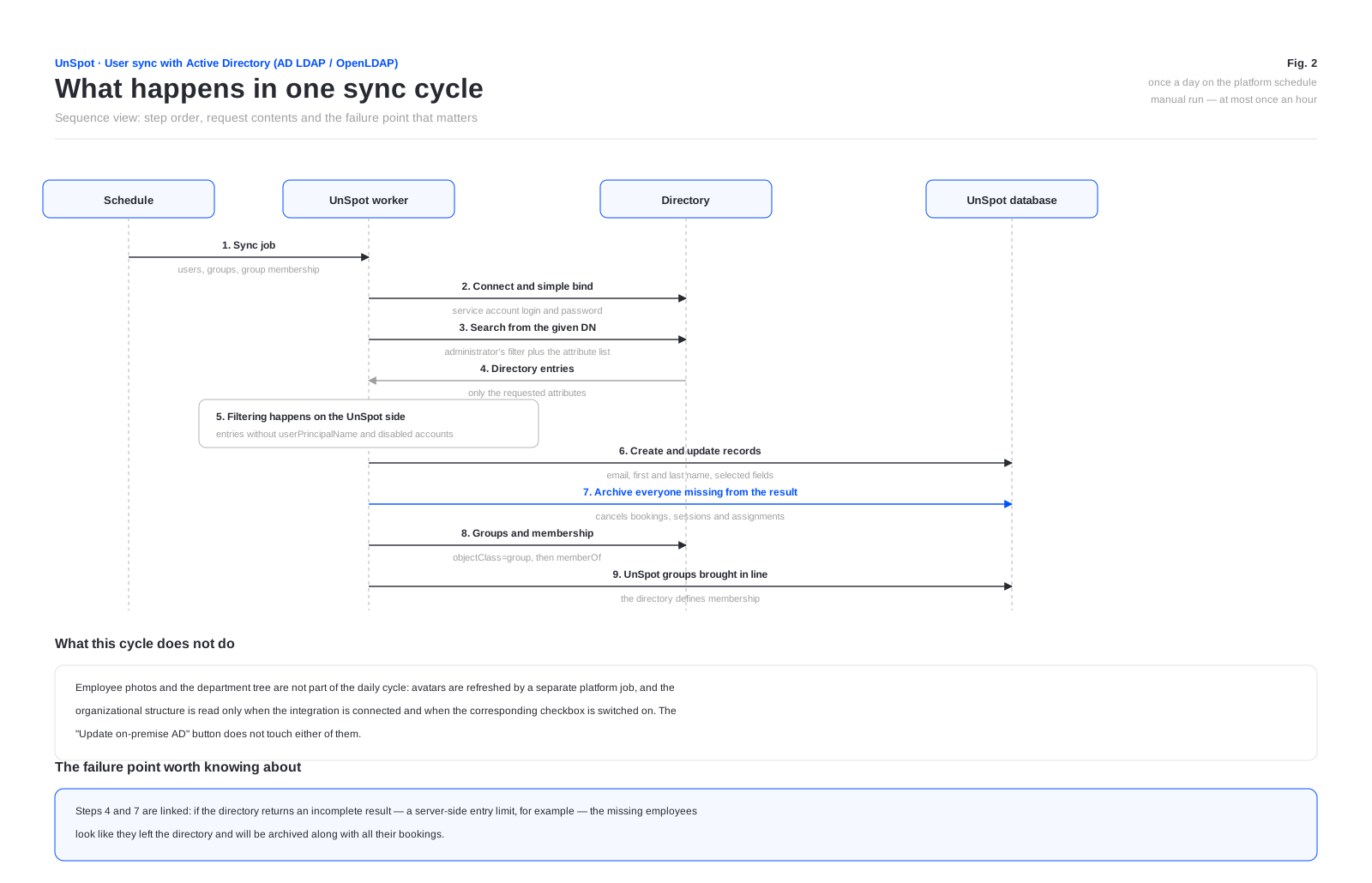
Automatic synchronization runs once a day on the platform schedule. In addition, an administrator can start the exchange manually with the Update on-premise AD button (the OpenLDAP card labels it Update on-premise) — at most once an hour.
Step order
- Users. UnSpot connects to the directory, reads entries from the given DN with the administrator filter applied, and brings employee records in line with the result.
- Groups. Group objects are read, and the matching UnSpot groups are created or updated. A group that drops out of the selection — deleted in the directory or cut off by the group filter — is deleted from UnSpot entirely, together with its role in booking policies and access rights.
- Group membership. The
memberOfattribute is read in a separate request, and UnSpot group membership is set to match the directory.
Employee photos and the department tree are not part of the daily cycle. Avatars are refreshed by a separate platform job, and the organizational structure is read only when the integration is connected and when an administrator switches on the Organizational structure sync checkbox. The manual run does not touch either of them: after a reorganization in the directory, the department tree in UnSpot will not update by itself.
How records are matched
- The primary key is
objectGUIDfor Active Directory anduidNumberfor OpenLDAP. It is stored in UnSpot as the external identifier of the record and identifies it in later cycles. - If no match by identifier is found, the record is looked up by email address — this is how the synchronization picks up records created in UnSpot by hand instead of creating duplicates.
- An entry with no
userPrincipalNameis skipped entirely. For OpenLDAP bothuidNumberandmailare mandatory: an entry missing either one is skipped even ifuidis chosen as the main attribute. - If
givenNameorsnis empty, the first and last name are split out of thenameattribute at the first space. OpenLDAP substitutes the email address instead. - Accounts disabled in Active Directory are excluded: UnSpot checks the
userAccountControlflags. OpenLDAP has no equivalent check — disabled entries are kept out only by the administrator filter. - The “account expired” flag (
accountExpires) is not processed: an expired but not disabled account stays active in UnSpot.
Groups are matched differently — by name: a directory group attaches to an existing UnSpot group with the same name (case-insensitive), and only when there is none is a new one created. The first cycle produces no duplicates.
What is sent to UnSpot
The administrator picks the field set with the checkboxes in the Synchronization data block. Email, first name and last name are always selected and cannot be cleared; the rest are sent only when selected. Below is everything UnSpot requests from the directory.
| Data | Directory attribute | When it is sent | What appears in UnSpot |
|---|---|---|---|
| Email address | userPrincipalName or mail — the administrator picks | always | The employee login. If the chosen attribute is empty or is not an address, userPrincipalName is used |
| First name | givenName, otherwise name | always | First name in the employee record |
| Last name | sn, otherwise name | always | Last name in the employee record |
| Record identifier | objectGUID | always | A service field: the external identifier used to recognise the record in later cycles |
| Object path in the directory | distinguishedName | always | Not written to the record. The OU= components are assembled into a department path used when the organizational structure is transferred |
| Disabled-account flag | userAccountControl | always | Not sent. UnSpot uses it only to filter entries |
| Department | department | when Department is selected | Department in the employee record |
| Manager | manager — the manager entry is read in an extra request to get the email address | when Manager is selected | Manager in the record. The email address is sent, not the full name |
| Phone | telephoneNumber | when Phone is selected | Phone in the employee record |
| Position | title | when Position is selected | Position in the record. Values longer than 128 characters are truncated |
| Badge number | numberPass | when NumberPass is selected | The access control system (PACS) badge number. This is not a standard directory schema attribute — you have to create it yourself |
| Photo | thumbnailPhoto | when User profile picture is selected | The employee avatar. Sent by a separate job, not in the main cycle |
| Group name and identifier | name and objectGUID of the group | when Synchronisation of groups is selected | A group in UnSpot |
| Group membership | memberOf of the user | when Synchronisation of groups is selected | Members of the UnSpot group |
| Departments | name, description and managedBy of organizationalUnit objects | when Organizational structure sync is selected | The department tree, the department description and the email address of its head |
In terms of personal data, what leaves the directory is: last and first name, work email address, work phone number, position, department, PACS badge number, employee photo and the email address of the manager — and only those of them that are selected in the settings. Payroll number, date of birth, home address and other HR details are never requested.
What is not sent
- Passwords and password hashes. UnSpot requests a fixed list of attributes and passwords are not on it. The UnSpot sign-in password is generated randomly on the UnSpot side.
- Anything from UnSpot back into the directory. There is no write-back: UnSpot creates, changes and deletes nothing — read access is all it needs.
- Bookings, schedules and employee activity. Nothing goes out.
- Inbound connections from the directory. UnSpot accepts no connections from the domain controller and opens no port for it: the exchange always starts on the UnSpot side.
- The rest of the directory contents. Attributes not listed in the table above are never requested.
One caveat that matters when granting permissions. For group and department objects the returned attribute list is not restricted — UnSpot reads those objects in full, including complete member lists. The same is true of manager entries in Active Directory, read through the manager reference. OpenLDAP differs: the manager query is limited to the same attribute set as the main user selection.
Direction and initiator of the exchange
Every connection is initiated by the UnSpot cloud. The directory never calls UnSpot, so this integration needs no outbound firewall rules — it needs inbound ones.
| What UnSpot does | Where the request goes | When |
|---|---|---|
| Connects and authenticates as the service account | LDAP or LDAPS to the domain controller in your network | at the start of every directory operation |
| Reads users from the given DN | the same connection | daily and on manual run |
| Reads groups and group membership | the same connection | daily and on manual run |
| Reads departments | the same connection | on connection and when the organizational structure checkbox is switched on |
| Reads employee photos | a separate connection for every employee | right away on connection and when the profile picture checkbox is switched on, then in a separate platform job |
The return flow is limited to the directory answers to those requests. Each step of the cycle — users, groups, group membership — opens its own connection with its own bind of the service account, so in the domain controller logs one cycle looks like a series of binds. One behaviour is worth calling out: the avatar job does not reuse a single connection — it connects and authenticates again for each employee. On a directory with a thousand accounts that is a thousand connections per job. Take it into account when tuning thresholds on your security tooling, otherwise normal operation will look like credential stuffing.
Protocol, ports and encryption
| Parameter | Value |
|---|---|
| Protocol | LDAP version 3. The scheme is set by the administrator in the Host field: ldap:// or ldaps:// |
| Port | The default in the form is 389, whichever scheme is used. For ldaps:// you have to enter 636 yourself |
| Channel encryption | Only through ldaps:// (implicit TLS). StartTLS is not supported |
| Authentication | Simple bind: the login and password are sent to the directory on every connection. Kerberos, NTLM and SASL are not used |
| Server certificate validation | Not performed — see the warning below |
| LDAP referrals | Disabled |
| Limit on returned entries | UnSpot sets none, and paged reading is not implemented — the directory server limit applies |
Directory server authenticity is not verified, and there is no setting to turn that on. UnSpot forces the mode in which the server certificate is not checked. In practice: an ldaps:// connection is encrypted but does not confirm that the other end really is your domain controller — the certificate may be self-signed, expired or issued to another name, and UnSpot will not notice. Compensating controls on your side: restrict inbound connections on the directory port to the UnSpot addresses (request the current list from UnSpot support), move the traffic into a dedicated segment or tunnel, and watch for route substitution with network controls.
A second consequence of the same kind: an ldap:// connection is not encrypted, so the service account login and password travel in the clear. The prefix is only validated in the settings form — a call made directly to the internal interface will accept an address without a prefix and connect unencrypted.
Where credentials are stored
- The service account password is encrypted before it is written to the workspace database — AES-256-CBC with a random initialisation vector. The encryption key is set at the UnSpot installation level.
- The service account login is not encrypted and is stored as is.
- The password is never returned by any UnSpot interface — not in the settings form, not in the integration status response. It can be entered again, but not read.
- The login is visible in the integration status response, and that request, unlike the other synchronization operations, does not require the integrations administrator role — any authenticated workspace user can make it.
One more place personal data can end up: the application log. If an employee record fails validation on write, the whole set of synchronized data for that employee — email address, name, phone, position, department, badge number — is written to the application log. Those logs are available to the UnSpot operations team, not to the workspace administrator.
What is cached and what stays in UnSpot
| What | Where | How long it lives |
|---|---|---|
| The mapping “directory identifier to UnSpot record” | a service table in the workspace database | while the synchronization is connected. Removed on disconnect and on reconnect |
| The mapping “group identifier to UnSpot group” | a service table | the same; additionally removed when the groups checkbox is cleared |
| The timestamp of the next available manual run | the platform cache | one hour, expires by itself |
| The user and group result of the current cycle | process memory only | until the job finishes; never written to disk |
| Employee photos | UnSpot file storage; a temporary directory during processing | as long as the record exists. The temporary file is deleted after processing |
There is no persistent cache of the directory result: every cycle reads the directory again. Disconnecting the synchronization does not delete employee records — they stay in UnSpot, but the link to the directory entries is cleared, and on a later reconnect objects are matched again by email address.
Network and permission requirements
- Directory reachability: the domain controller must accept inbound connections from the UnSpot addresses on the LDAP or LDAPS port.
- Service account permissions: read only. Read access is needed to user objects (including
userAccountControlandobjectGUID), group objects and department objects, plus thethumbnailPhotoattribute when avatars are transferred. No write permission is required for any operation. - Search container: the container DN is mandatory — the form does not allow searching from the directory root. Anything outside the given DN is never read.
- Narrowing the result: the LDAP filter is set by the administrator. With an empty filter, every matching object inside the given DN is synchronized.
What happens when an employee disappears from the directory
First, set aside the case when the directory is simply unreachable: that is not a disappearance, and nothing destructive happens — the cycle stops before any matching, nobody is archived, and the exchange retries on schedule. If the directory answers with an authentication error, the connection is marked invalid: the card shows an invalid-account notice and a Reconnect button, and synchronization stops until an administrator re-checks the credentials.
This is the part that matters most in day-to-day operation, and it is worth going through before you connect. If an employee stops appearing in the result — deleted from the directory, account disabled, or moved outside the filter — the UnSpot record is archived. Archiving means all of the following:
- every booking made by the employee is cancelled;
- their sessions and access tokens are deleted;
- calendars they connected are removed;
- locker cell bookings are released;
- the assigned desk and parking space are released;
- delegate rights on meeting rooms are revoked;
- the employee is removed from every group, team and favourites list;
- the record itself is not deleted from the database — it is flagged as archived, and if the employee returns to the directory the record is restored.
Hence a risk to weigh during your review. UnSpot sets no limit on the number of entries returned, and paged reading is not implemented. If the directory returns an incomplete result — a server-side limit on response size, for example — the missing employees look as though they left the directory, and their records will be archived along with every booking. Check the response size policy on the domain controller and keep the filter narrow enough for the result to fit within it.
How OpenLDAP differs from Active Directory
The settings form is the same for both cards, but they read the directory differently. The differences that matter for a review and for operation:
| What | AD LDAP | OpenLDAP |
|---|---|---|
| User object class | objectClass=user | objectClass=inetOrgPerson |
| Group object class | objectClass=group | objectClass=posixGroup |
| External identifier | objectGUID | uidNumber |
| Mandatory attributes | userPrincipalName | uidNumber and mail |
| The “main attribute” option | userPrincipalName — and that is what is read | labelled userName, but uid is what is actually read |
| Department attribute | department | departmentNumber |
| Photo attribute | thumbnailPhoto | jpegPhoto |
| Group membership | from memberOf of the user | from memberUid of the group |
| Disabled accounts filtered out | yes, by userAccountControl | no |
| Service groups filtered out | yes | no |
| Department name | the name attribute | the ou attribute |
| Head of department | transferred from managedBy | not transferred |
| If first and last name are empty | split out of name | the email address is used |
What to weigh during your review
- The directory is reachable from outside. The cloud initiates the connection, so the domain controller is exposed to inbound traffic from UnSpot rather than isolated inside your network.
- Server authenticity is not verified.
ldaps://gives you encryption but no server authentication, and the behaviour cannot be turned off — compensating network controls are required. - Directory credentials are stored by UnSpot. The password is encrypted, the login is not, and the login is visible in a status response to any authenticated workspace user.
- An incomplete result archives employees, cancelling their bookings and sessions.
- Personal data can reach the application log when a record fails validation.
- The once-an-hour limit belongs to the console button, not to the mechanism: the internal interface has an operation that starts the exchange without that limit, available to the integrations administrator role.
What ends up in the logs. Business events of the synchronization — record creation, updates, archiving — are visible in the User management history report with the synchronization initiator. Cycle errors go to an internal synchronization log that workspace administrators do not see. On a validation error the directory row data lands in the platform application log — account for that in your personal-data handling model.
