
Desk types
The type of use is the main parameter of a desk: it decides whether the desk is freely bookable, assigned to an employee or taken out of circulation. The former names “Hot”, “Hoteled”, “Assigned to one” and “Assigned to several” are no longer used in the interface — below is the current structure and what each old type became.
Where the type is set
The type is set in the desk card, inside the map editor: “Manage → Office management → Workspaces” → “Change map” → on the Drafts page open the published version or a draft → the Settings mode → double click the desk (the pencil button above the selected desk and cmd/ctrl + E open the card as well).
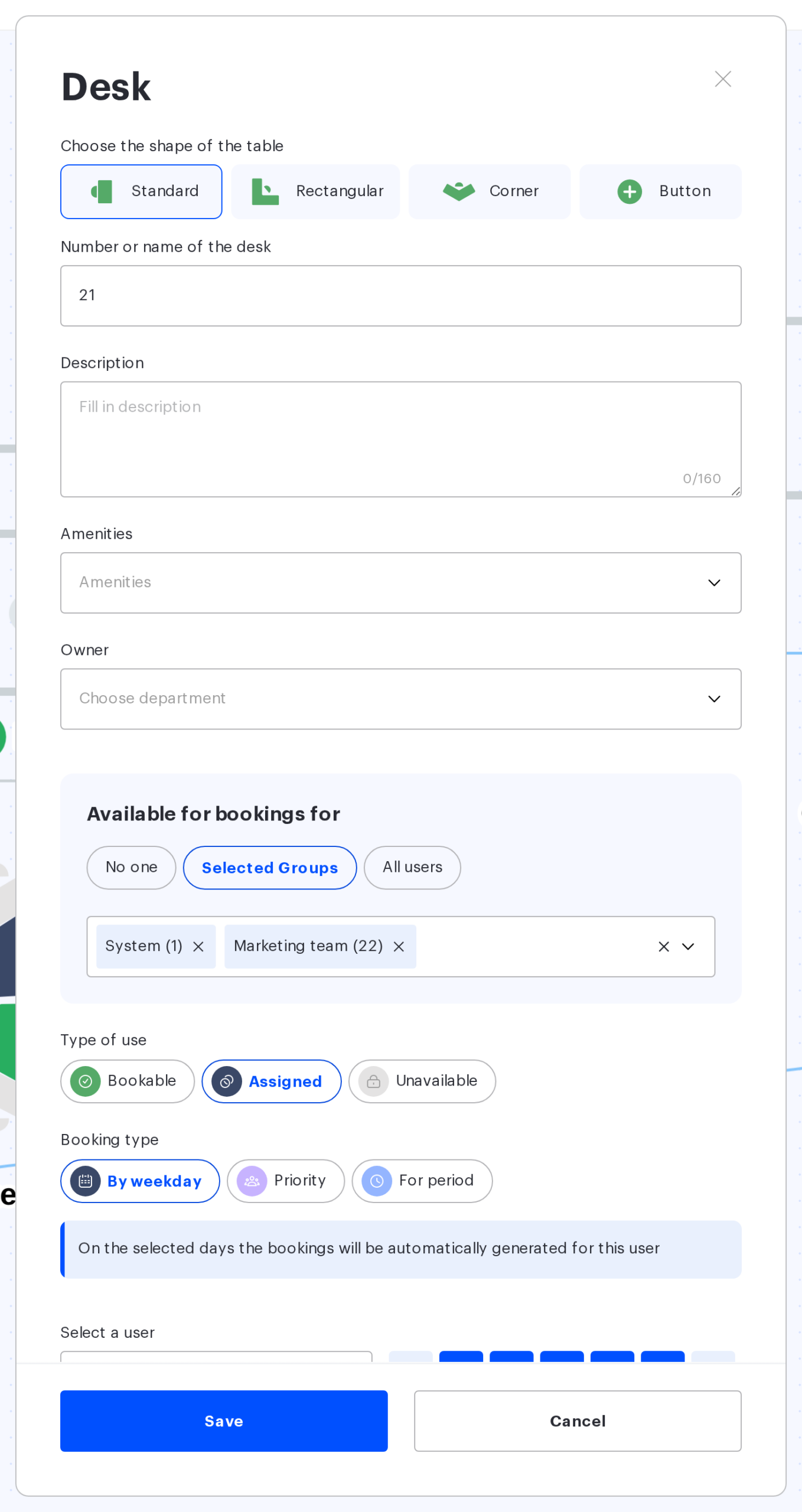
Parking spaces have the same switch — see “Parking spaces on the map”.
The three types of use
| Type of use | What it means | Subtypes |
|---|---|---|
| Bookable | the desk is freely booked by employees who have access to it | “On any days”, “Day to day” or “Priority” (Access Groups get priority on selected weekdays) |
| Assigned | the desk is assigned to one employee or to several | “By weekday”, “Priority” (several employees) or “For period” |
| Unavailable | the desk is visible on the map but cannot be booked — during a repair, for example | no subtypes |
Subtypes: how the place is actually taken
| Subtype | How it works | What to keep in mind |
|---|---|---|
| On any days | the desk is booked in advance for any date (the former “Hoteled”) | — |
| Day to day | the desk is booked for the current day only (the former “Hot”) | parking spaces do not have this subtype |
| Priority (for a bookable desk) | the desk stays bookable, but on the selected weekdays the chosen Access Groups get priority when booking; in the card you select a group and fill in the weekday schedule | if nobody from these groups takes the desk, the other employees with access can book it |
| By weekday | the desk is assigned to an employee on the selected weekdays (the former “Assigned to one”); bookings are created automatically | the system keeps a 28-day horizon and extends it daily |
| Priority (for an assigned desk) | the desk is assigned to several employees: they get priority when booking (the former “Assigned to several”) | the desk stays bookable for everyone else if the priority users have not taken it |
| For period | the desk is assigned to an employee for a period with a start and an end date | three months at most: the system answers “The assignment period cannot exceed three months”. The subtype is not available inside a draft |
The “Priority” button exists under both types but means different things: for a bookable desk, Access Groups get priority on selected weekdays; for an assigned desk, specific employees do.
If an assigned employee releases the desk — marks “remote” or “not working” in the schedule, for example — employees with access can book it on those days. The assignment itself is kept.
How the types look on the map
In the Print mode the “Usage type” colour scheme paints the places by their state, and the legend on the right lists five values:
- available for booking on any day;
- available for booking on this day only;
- assigned to one user;
- priority: assigned to several users;
- unavailable.
Colour schemes and printing are covered in “Printing the office map”.
What happens to bookings when the type changes
- switching an existing desk to “Day to day” is the only case where the editor warns you: “All the upcoming bookings of this desk will be removed if you change the desk type. Want to proceed?”. After “Yes”, all future bookings of the desk are removed when the map is saved;
- switching a desk to “Unavailable” opens the “Change place status” window with two options: “Release the place” removes the existing bookings, “Keep bookings” keeps them. The card is not saved until one option is selected;
- a new or changed “By weekday” or “For period” assignment opens the “Assign a place?” window with “Strict assign” / “Soft assign”; changing the list of “Priority” employees opens the same window with “Delete bookings” / “Keep bookings”. What each option means is covered in “Assigning a desk to an employee”;
- other changes — “Day to day” → “On any days”, for example, or a different set of groups for a bookable “Priority” desk — are saved without questions, and no bookings are removed. Removing an assignment does not open a window either;
- whether to notify employees is asked by the map editor once — when you click “Publish changes” on the published map; publishing a draft never sends emails.
How parking spaces differ
- a parking space has the same three types of use;
- a bookable parking space has no “Day to day” subtype: only “On any days” and “Priority” (Access Groups by weekday);
- an assigned one has no “For period”: only “By weekday” and “Priority”;
- access is set by the same “Available for bookings for” block: “No one”, “Selected Groups” or “All users”.
Related articles
- Assigning a desk to an employee — reseating options and notifications;
- Desks on the map — every field of the desk card;
- Map editor: configuring placed objects — where to change the type and how to set it for many desks at once;
- Parking spaces on the map — the same types for parking;
- Office map editor: an overview of the actions — every action with the map.
