
Locker integration: lock system API requirements
This document describes how UnSpot exchanges data with an external electronic lock management system for lockers. It is addressed to integrators and hardware vendors: for locks to work with UnSpot lockers, the lock system must expose four endpoints in the format described below. Connecting a system that is already in place is covered in “Locker integration setup: Pocket Lock”.
How the exchange works
The exchange is one-way: UnSpot always initiates it. The lock system only answers requests — this integration has no callbacks, webhooks or event subscriptions. Requests are sent by the UnSpot application server, not by the administrator’s browser, so the address has to be reachable from the UnSpot servers specifically.
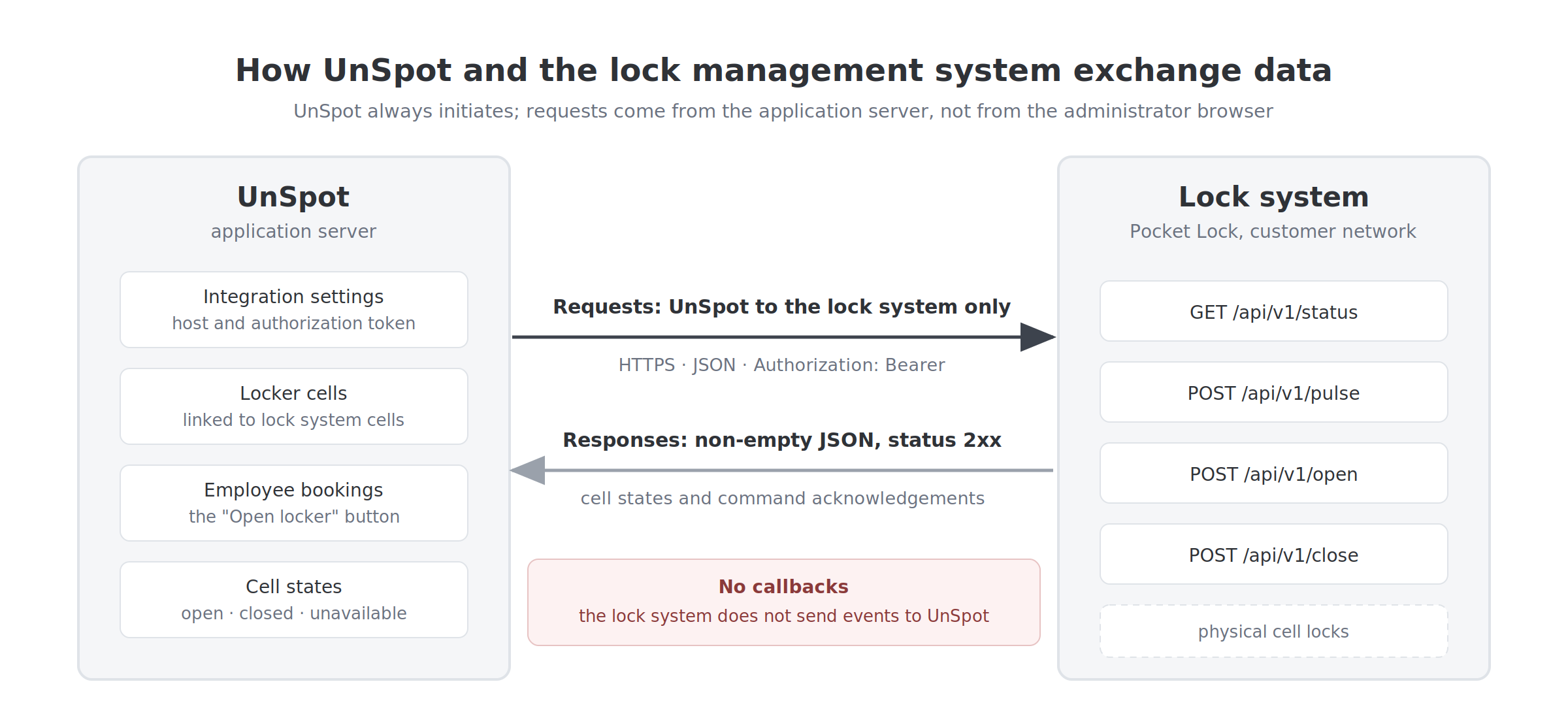
The base address is the value the administrator entered in the Host field when connecting the integration; UnSpot appends the endpoint path to it. Neither the scheme, nor the port, nor the path version is added automatically — the address is used exactly as stored, minus a trailing slash.
| What happens in UnSpot | Request that is sent |
|---|---|
| An administrator saves the connection settings | GET /api/v1/status — this validates the address and the token |
| An administrator opens the locker map editor | GET /api/v1/status — the response builds the list of cells available for linking |
| An administrator saves a locker map after assigning a lock system cell | GET /api/v1/status — refresh of the stored states, run as a background job and therefore with a small delay |
| An employee presses “Open locker” | POST /api/v1/pulse |
| The unspot:sync-external-locker-cell-states command and maintenance scenarios | POST /api/v1/open, POST /api/v1/close |
Keep in mind. There is no scheduled background polling: between the events listed above UnSpot does not call the lock system and does not refresh the stored cell states.
Authentication
The token the administrator entered in the Authorization token field is sent with every request in a single header:
Authorization: Bearer <token>- the only scheme is Bearer. Basic authentication, a key in the query string, mutual TLS and fetching a token with a separate request are not supported;
- one token covers the whole workspace: there are no per-office, per-locker or per-cell tokens;
- the value can be up to 255 characters long. For the Host field the interface requires at least 4 characters, the server-side check at least 2;
- rotating the token on the lock system side requires reconnecting the integration in UnSpot: the old value stops working immediately and there is no other way to update it.
Requests sent by UnSpot
There are four requests in total. Two of them — status and pulse — are required for the integration to work: they serve the connection, the cell list and the opening of a lock from the interface. The other two, open and close, are part of the contract but are not called by the current interface.
Cell states — GET /api/v1/status
The only read request. It returns every cell of the lock system together with its state. UnSpot uses it in three roles at once: as a connection check, as the source of the cell list for linking, and as the way to refresh the stored states.
GET /api/v1/status
Host: lockers.example.com
Authorization: Bearer <token>Expected response:
{
  "id": {
    "101": { "status": false },
    "102": { "status": true },
    "103": { "status": "offline" }
  }
}| Field | Type | What it means |
|---|---|---|
| id | object | Required root key. The keys of the nested object are cell identifiers, the values are the state of each cell |
| key inside id | number | The cell identifier in the lock system. It must be numeric — a non-numeric value causes an error while a cell is being created rather than a readable validation message |
| status | true, false or the string offline | true — the lock is open; false — the lock is closed; offline — the controller of this cell is unreachable |
What UnSpot does with the response:
- shows in the locker cell form only the identifiers that are not yet linked to other UnSpot cells;
- stores two flags on a linked cell — “open” and “lock unavailable”;
- if a previously linked identifier is no longer in the response, the link is kept, but the state of that cell stops being refreshed and a warning is written to the UnSpot server log.
Keep in mind. A missing root key id is treated by UnSpot as a protocol error, not as an empty list — the connection will fail. An empty set of cells has to be sent explicitly as “id”: {}.
Open pulse — POST /api/v1/pulse
The main working scenario: the lock opens and locks itself again after the given time. This is the request sent when an employee presses “Open locker” on the Lockers page or in My bookings.
POST /api/v1/pulse
Host: lockers.example.com
Authorization: Bearer <token>
Content-Type: application/json

{
  "id": 101,
  "time_ms": 10000
}| Field | Type | What it contains |
|---|---|---|
| id | number | The cell identifier, taken from the GET /api/v1/status response |
| time_ms | number | How long the lock stays open, in milliseconds. UnSpot always sends 10000, that is 10 seconds; the value is not configurable in the interface |
The lock system must open the lock and close it on its own once time_ms has elapsed. UnSpot sends no separate closing command after a pulse.
Open and close — POST /api/v1/open, POST /api/v1/close
A pair of commands: the first releases the lock and leaves it open, the second locks it again. Both use the same body.
POST /api/v1/open
Host: lockers.example.com
Authorization: Bearer <token>
Content-Type: application/json

{
  "id": 101
}Keep in mind. The current version of the UnSpot interface has no buttons that trigger these two commands: employees and administrators can only send the pulse. Both endpoints are nevertheless part of the contract and are exercised during integration, so they do need to be implemented.
Requirements for the lock system
| Requirement | Details |
|---|---|
| Four endpoints | status, pulse, open, close — at the paths and with the methods listed above. Without status and pulse the integration does not work at all; open and close complete the contract |
| Bearer token | Validation of an Authorization header with the Bearer scheme. UnSpot does not send any other authentication scheme |
| JSON in every response | A non-empty body that decodes into an object or an array — for all four requests, including open, close and pulse. A bodyless response (204, or 200 with an empty body) is treated as an error and shown to the user |
| 2xx on success | Any 4xx or 5xx response is treated as a failed request |
| Numeric identifiers | A cell identifier must be a number. UnSpot will not handle string or composite identifiers correctly |
| Stable identifiers | The identifier of a physical cell must not change over time: this is exactly what the UnSpot link stores. An identifier that disappears from the response counts as a lost cell |
| Network reachability | The address must be reachable from the UnSpot application servers. For a system deployed inside the customer network this is a separate task for the network administrator |
| Valid certificate | Over HTTPS the certificate goes through normal validation. A self-signed certificate causes a connection error, and validation cannot be switched off in UnSpot |
| Response time | The response must fit the standard outgoing-request timeout of the UnSpot server. Slow responses look to administrators and employees like an unavailable system |
What the lock system does not have to do:
- push events to UnSpot — there are no inbound endpoints for a lock system in UnSpot;
- support pagination, filters or a single-cell state request — the list is always fetched in full;
- issue a token through a separate request — the token is entered by the administrator by hand;
- report who occupies a cell — bookings live on the UnSpot side and are never sent to the lock system.
Behaviour on failure
- There are no retries. A failed request is not resent: a single network error turns into an error for the user straight away;
- The connection error is not itemised. An unreachable address, a wrong token, an expired certificate and an unexpected response format all produce the same text for the administrator — “The remote server is not responding. Check the correctness of the entered data.” The actual cause is visible in the UnSpot server log;
- Employees see a generic message. If the command did not reach the lock, “Something went wrong. Please try again later” appears;
- The “lock unavailable” flag is not surfaced. UnSpot stores it from the status response, but in the list of cells available for linking an offline cell looks the same as a working one.
