
Subscribing to colleagues in the schedule
Subscribing to a colleague is the star next to their name in the Work schedule section. It lifts their week into a separate block at the top of the page and switches on a message the day before they come to the office. This article covers how to subscribe, what a subscription changes and what it does not change, and how it differs from a team.
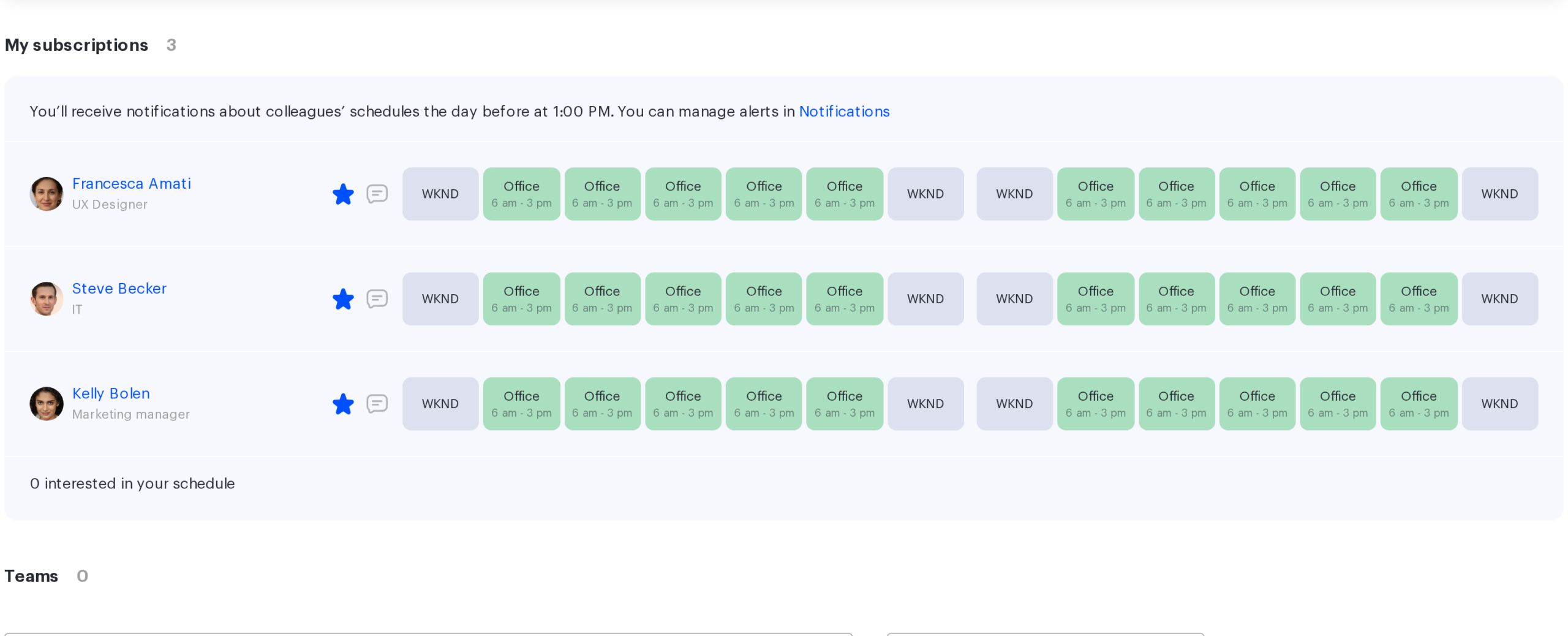
What a subscription gives you
A subscription is a mark saying “I follow this person’s schedule”. It does three things and nothing beyond them.
- The colleague appears in the My subscriptions block at the top of the Work schedule page — their week is visible at once, without searching.
- The day before a day when one of your starred colleagues will be in the office, you receive a message about it.
- The colleague is counted on their side: they see the line “N interested in your schedule”.
The colleague receives no notification about the subscription — neither an email nor an in-app message. They only see an anonymous counter and cannot find out who exactly follows them.
How to subscribe and unsubscribe
- Find the colleague in the All colleagues block or in your team block.
- Press the star to the left of their name — it becomes filled.
- To unsubscribe, press the filled star again.
You cannot subscribe to yourself. There is no limit on the number of subscriptions, though the My subscriptions block shows at most a thousand people — in practice that ceiling is out of reach.
When you have no subscriptions yet, a hint is shown instead of the block: “You have not subscribed to anyone yet. To keep track of your colleagues schedules, click on the star icon”.
The message about starred colleagues
Once a day, the system checks the schedules of your starred colleagues and sends a message about those who will be in the office tomorrow. The time is stated in the caption of the My subscriptions block — “You’ll receive notifications about colleagues’ schedules the day before at …”.
The message does not arrive every day: the conditions and the full list of the section’s notifications are covered in Work schedule notifications. In short, no message is sent if tomorrow is a weekend, you have no subscriptions, you already have a booking for tomorrow, or none of your starred colleagues is in the office tomorrow.
If more than ten starred colleagues will be in the office tomorrow, the message lists the first ten.
The channels are email, push, Slack and Telegram when they are linked. The message is switched off in the profile, in the Notifications section, with the “Notify when favorite colleagues are in the office the day before at …” toggle.
Who is interested in your schedule
Below the subscriptions block there is a line “N interested in your schedule” — the reverse side of the same link: that many people have starred you. The names are not revealed either to you or to them, the counter cannot be influenced, and only the subscriber can remove their subscription.
A subscription and a reporting line are different things
The My subscriptions and Teams blocks look similar on the page, but they are built by different rules and should not be confused.
| My subscriptions | Teams | |
|---|---|---|
| Who gets in | Whoever you starred | Your subordinates, members of your teams and employees of the department you head |
| Who controls the list | You | The administrator — through the employee profile and the org structure |
| Can you change their schedule | No | Yes, if they are your subordinates |
| Notifications | A message about starred colleagues in the office | None |
A subscription grants no rights: you see exactly what you would see in the general list of colleagues.
Limits and common misconceptions
| Misconception | How it actually works |
|---|---|
| The colleague finds out that I subscribed to them | No. They only see the number of subscribers |
| A subscription lets me change a colleague’s schedule | No. Rights come from the reporting line, not from a subscription |
| The message arrives every day | No — only when there is something to report and you are not going to the office yourself |
| A subscription adds the colleague to my team | No, these are independent lists |
