
Public holiday calendar
The public holiday calendar defines the company’s days off and public holidays: the default weekly days off and individual dates — holidays, transferred days, working Saturdays. The calendar affects employee schedules, automatic bookings of assigned desks, booking policies and analytics calculations.
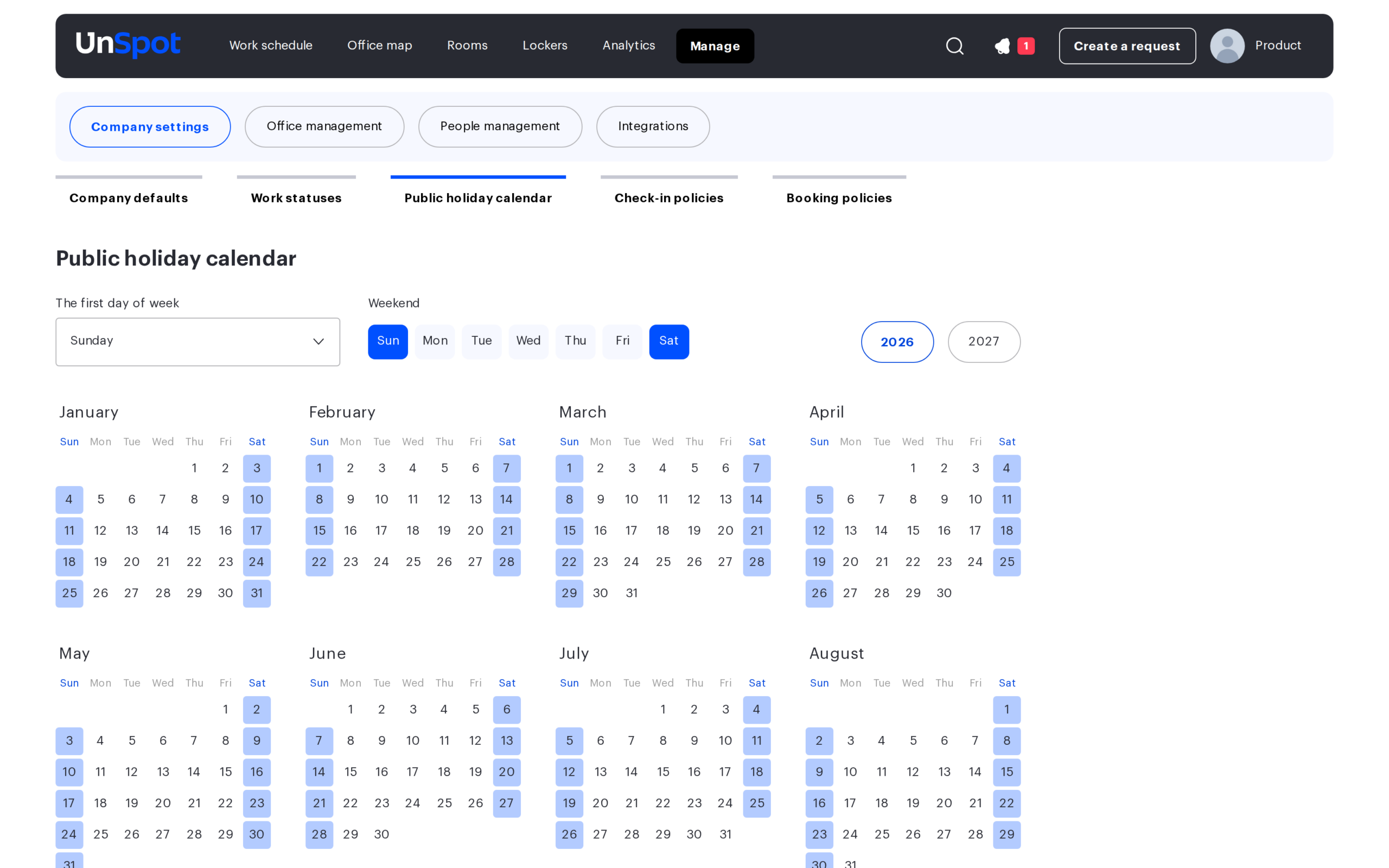
Location
Open Manage → Company settings → Public holiday calendar. The calendar can be changed by the Super Administrator and offices administrators; office managers cannot change it.
Page settings
| Setting | How it works |
|---|---|
| The first day of week | Monday or Sunday — the day UnSpot calendars start the week with. The setting is company-wide (it is duplicated in the general company settings) |
| Weekend | The week template: mark the days that count as days off by default. If left unchanged, the days off are Saturday and Sunday. Any days of the week can be marked |
| Year selection | Buttons for the current and the next year above the month grid |
| Month grid | The 12 months of the selected year. Clicking a date toggles its status: “The day is marked as a public holiday” ↔ “The day is marked as a workday”. An explicit date mark overrides the week template — this is how both holidays and working Saturdays are set |
There is no “Save” button on the page: every change — the first day of the week, the weekend set, a click on a date — applies immediately and affects the whole company (schedules, automatic bookings, booking limits, analytics).
Limitations
- A holiday has no name — only the date and its workday / day-off status are stored.
- A date range cannot be selected — days are marked one at a time.
- There is one calendar for the whole company — different holidays for different offices cannot be set.
- Marks are not carried over to the next year automatically — the new year is marked up from scratch.
- A date’s mark cannot be removed entirely: another click switches its status to the opposite, but the date remains manually marked and no longer follows the week template. If the weekend set is changed later, such dates keep their manual status.
- In the grid a manually marked date looks the same as a template day off — they cannot be told apart visually.
What the calendar affects
| Area | Effect |
|---|---|
| Employee schedules | A day gets the “holiday”, “day off” or “workday” status. A date explicitly marked as working becomes a workday even on template days off |
| Assigned desks | The daily auto-generation of bookings for assigned desks and parking spots skips the dates explicitly marked as non-working in the calendar. It does not take template weekends into account — those are only skipped by the generation for period-based assignments |
| Booking policies | The “how many days ahead bookings are allowed” limit is counted in working days — days off and holidays do not consume the limit |
| Analytics | The summary figures of the “By office”, “By desks” and “By employee” pages are counted over working days; desk costs are normalised to the working days of the period. The “Average workload by day of the week” charts and the meeting-room heat map are built over all calendar days |
| Reports | In the schedule and attendance CSV reports the “Number of Weekends and Holidays” column follows the public holiday calendar. Do not confuse it with the “Number of Non-Working Days” column — that one counts the days on which the employee set a “not working” status in the schedule; the calendar does not affect it |
