
Resources report
The Resources report page lets administrators export data about the company’s resources — desks, parking spaces, meeting rooms, offices and points of interest. Depending on the report type, you get a CSV file (resource settings, direct links, premises data) or a ZIP archive with printable QR-code cards for check-in, resource information, map location or service requests.
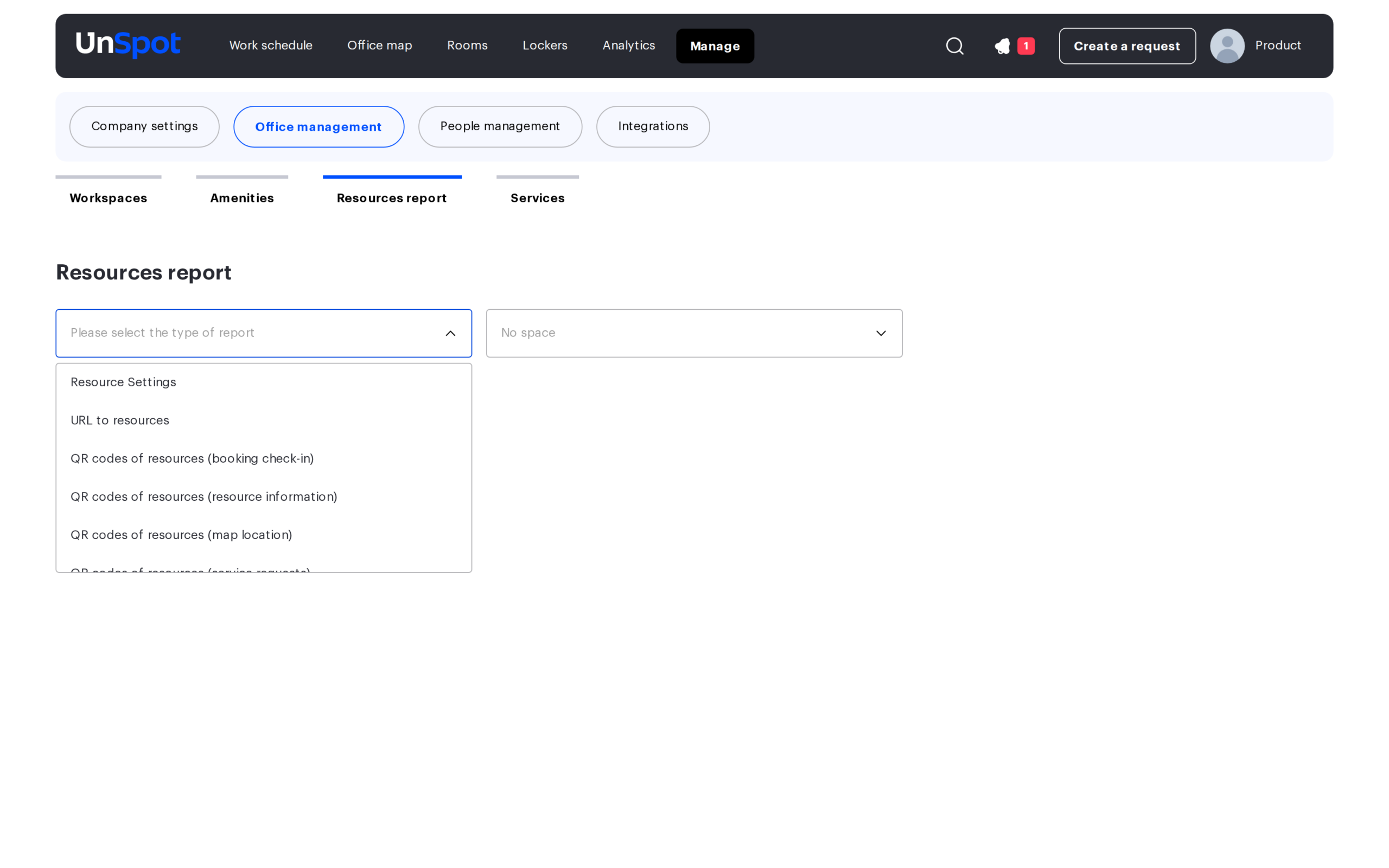
Where to find the page
Go to Manage → Office management → Resources report. The page is available to Super administrator, Office manager and Office administrator.
Rights nuance. Resource Settings and both premises exports work for all three roles, while URL to resources and all four QR exports are available only to a Super administrator or an Office administrator — an Office manager gets an access error when downloading them.
Report types
The Type of report list contains eight exports:
| Report | Format | What it contains |
|---|---|---|
| Resource Settings | CSV | Configuration of every selected resource: location, usage type, assigned users and access groups, description |
| URL to resources | CSV | Direct links to the selected resources |
| QR codes of resources (booking check-in) | ZIP | QR cards employees scan to confirm a booking at the desk or room |
| QR codes of resources (resource information) | ZIP | QR cards that open the resource information page |
| QR codes of resources (map location) | ZIP | QR cards that open the resource’s location on the office map |
| QR codes of resources (service requests) | ZIP | QR cards that open the service request form for the resource |
| Unload premises data | CSV | Inventory data of offices: areas, seating density, occupancy, ownership and lease details |
| Unload a list of premises | CSV | List of rooms with floor, area, purpose and desk counts |
How to generate a report
- Select the export in the Type of report field.
- Pick offices in the Space filter (multi-select; the No space option covers resources outside any office).
- Narrow the selection with the Type of resource filter. The available values depend on the report: All, Desk, Parking space, and for QR and URL exports also Meeting room, Office and Points of interest.
- Click Generate report. A preview table appears with the columns Office name, Resource name and Space type; use the checkboxes to keep only the resources you need.
- Click Download to save the CSV file or the ZIP archive. The button stays disabled until at least one row is selected.
The preview table loads in pages of 50 rows as you scroll and shows Nothing found when the selection is empty. The two premises exports skip the preview entirely — the file downloads straight away. If no office is selected, the URL and QR exports return only meeting rooms and lockers: desks, parking spaces, offices and points of interest require an explicit space.
What’s inside the files
CSV files are saved in UTF-8; the English interface uses a comma as the delimiter (the Russian one uses a semicolon). The file name matches the name of the export.
Resource Settings (CSV)
| Column | What it contains |
|---|---|
| City | City of the office the resource belongs to |
| Building | Parent space (building) of the resource |
| Floor | Floor the resource is located on |
| Place ID | Internal identifier of the resource |
| Place Name | Name of the desk, parking space or room |
| Type of resource | Object type; exported as the raw value DESK or PARKING |
| Usage | Usage type of the resource. Exported as the raw values Hot, Book, Daily Assigned, Multi assigned, Priority booking, Not available |
| Users | Users the resource is assigned to |
| Email addresses of the assigned users | |
| Groups | Access groups that can book the resource |
| Description | Resource description |
| Department | Department linked to the resource |
URL to resources (CSV)
Three columns: Office name, Resource name and link — a direct URL that opens the resource in UnSpot. Use it to embed resource links into intranet pages, room signage or internal wikis.
QR-code archives (ZIP)
All four QR exports download a qr-codes.zip archive. Inside, files are grouped into folders by office. Each file is an SVG card with the QR code, the resource name, your company logo and brand color — ready for printing. Files are named by resource type and name (for example, Desk_77.svg); if two resources share a name, a numeric suffix like (2) is added.
What a scanned code opens depends on the export you chose: the booking check-in flow, the resource information page, the resource pinned on the office map, or the service request form (see Service requests).
Premises exports (CSV)
Unload premises data exports office-level inventory data. Fill in the inventory section of the office form to get meaningful values.
| Column | Format | What it contains |
|---|---|---|
| Space | Text | Office name |
| City | Text | City of the office |
| Address | Text | Office address |
| Groups/Departments | Text | Groups or departments linked to the office |
| Active (yes/no) | Yes / No | Whether the office is active |
| External ID | Text | External (cadastral) identifier of the premises |
| Total area. m2 | Number | Total office area |
| Usable area. m2 | Number | Usable office area |
| Common area. m2 | Number | Common areas |
| Max number of desks | Number | Maximum number of desks in the office |
| Total area density. m2 per person | Number | Seating density against the total area |
| Usable area density. m2 per person | Number | Seating density against the usable area |
| Actual number of employees | Number | Employees actually assigned to the office |
| Actual total area density. m2 per person | Number | Actual density against the total area |
| Actual usable area density. m2 per person | Number | Actual density against the usable area |
| Office occupancy. % | Percent | Share of occupied desks |
| Form of ownership | Lease / Ownership | How the premises are held |
| Lease end date | Date | When the lease ends |
| Responsible person | Text | Person responsible for the lease |
| Responsible person’s email | Their email address |
Unload a list of premises exports room-level data:
| Column | Format | What it contains |
|---|---|---|
| City | Text | City of the office |
| Business Center | Text | Business center name |
| Inventory number | Text | Inventory number of the room |
| Address | Text | Office address |
| Floor | Number | Floor number |
| Space | Text | Room (premises) name |
| Floor Area | Number | Room area |
| Purpose | Office / Meeting room / Server room / Warehouse / Kitchen / Cloakroom | Room purpose taken from the office card. The Private office purpose is not mapped in this export — such a cell stays empty |
| Number of desks (max) | Number | Maximum number of desks in the room |
| Assigned Desk | Number | Occupied (assigned) desks |
| m2 per 1 person | Number | Area per person |
Related articles
- Service requests
- Desk types
- Amenities management
- Locker management
- “In the office” requests: setup and QR codes — what the resource QR codes are for and what to do with them next
