
Tariff analytics: limits, modules and subscription term
The Tariff tab in the Analytics section shows what your company subscription to UnSpot includes and how it is used: how many days are left, how many users, desks, meeting rooms, parking places, lockers and points of interest exist compared to the limits, which modules and integrations are included in the tariff and which of them are actually in use. The page is read-only: the tariff cannot be changed from it.
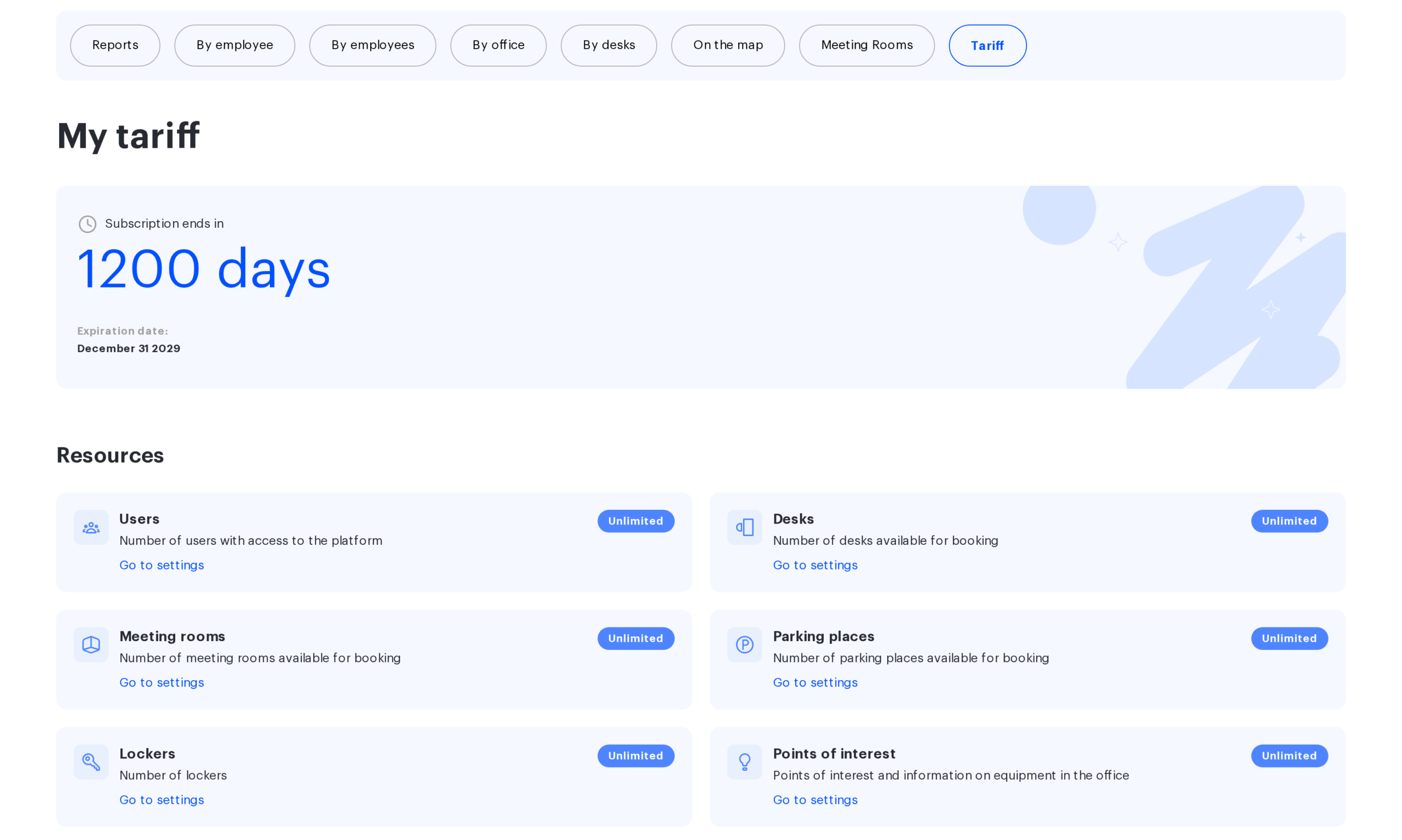
Where it is and who sees it
Open Analytics > Tariff. The page title is My tariff. The tab is available to the Super Administrator, Office manager, Offices Administrator and Users Administrator roles. The Integrations Administrator role and regular employees do not see the tab. A regular employee who follows a direct link is redirected to their start page, while an Integrations Administrator can open the page by a direct link — with links on the four integration cards listed below only.
The data is the same for everyone who sees the tab. Only the Go to settings links on the cards differ: each link is tied to specific roles and is shown on desktop only — the mobile version has no links. The Office services card has no link for anyone. The Super Administrator sees the links on every other card. The Users Administrator sees a link only on the Users card. The Offices Administrator sees links on the resource cards (except Users) and on the Meeting room services, Visitor management, Office inventory, Check-in via PACS and Check-in via Wi-Fi cards; the Subscription to system notifications, Office presence indication, User synchronization and Corporate messenger cards show no links to them — only to the Super Administrator and the Integrations Administrator. The Office manager sees the page, but it shows no links.
Subscription card
The top card answers one question: when the subscription ends. It shows three values:
- Subscription ends in N days: the difference between the expiration date and today, counted in calendar days regardless of the time of day.
- Expiration date: the last day the subscription is valid.
- Card color. When 1 to 30 days remain, the number is highlighted in a warning color; when the subscription has already expired, the card turns red and the number is shown with a minus sign, meaning that many days have passed since the expiration date.
Renewal and changes to the tariff are arranged with your UnSpot manager, not on this page.
Resources: limits and actual usage
The Resources group contains six cards with a badge of the form N of M: N is how many objects the company has now, M is how many are included in the tariff. When there is no limit, the badge reads Unlimited. A card whose actual number does not exceed the limit is colored as paid; a card with an excess or a zero limit is highlighted as not paid.
| Card | What is counted | What is included |
|---|---|---|
| Users | Employee accounts of the company | All users except device accounts (meeting room tablets) |
| Desks | Desks available for booking | Desks in non-archived offices. If the tariff counts Active desks, only enabled desks in enabled offices are counted; if it counts All, every non-archived desk is. The counting mode is shown before the number |
| Meeting rooms | Meeting rooms available for booking | All meeting rooms of the company |
| Parking places | Parking places | Places in non-archived offices; the Active / All mode works as for desks |
| Lockers | Locker cells | All cells of all lockers in the company |
| Points of interest | Objects on the office map: equipment, printers and other markers | Objects placed on the plan of an enabled, non-archived office |
The Go to settings button opens the corresponding console section: Manage > Users for users, Manage > Offices for the other resources and, for the remaining cards, the settings or integrations section the card belongs to.
Modules: office management and integrations
The Office management and Integrations groups work differently: they are not counters but two flags, included in the tariff and in use. The combination of the two flags gives one of four badges:
| Badge | In the tariff | In use | What it means |
|---|---|---|---|
| Used | yes | yes | Normal state |
| Paid but not used | yes | no | The module is available but not configured; you may be paying for an unused feature |
| Available, but not paid | no | no | The module can be added by contacting your manager |
| Used, but not paid | no | yes | The feature is in use without being included in the tariff; the card is highlighted as not paid |
What counts as in use for each card:
| Card | The module counts as used when |
|---|---|
| Meeting room services | Meeting room services are enabled in the company settings |
| Visitor management | The visitor pass request module is enabled in the company settings |
| Office services | The card is shown with a lock icon and is not counted yet: the module is under development |
| Office inventory | At least one non-archived space has its inventory card filled in (area, purpose) |
| Subscription to system notifications | At least one outgoing webhook exists (Manage > Integrations > Webhooks) |
| Office presence indication | At least one PACS is connected as a source of entry and exit events |
| User synchronization | User synchronization with the company directory is configured or SCIM is connected |
| Check-in via PACS | Strict PACS check-in is enabled in the check-in settings of the company or of at least one office |
| Check-in via Wi-Fi | Strict Wi-Fi check-in is enabled in the check-in settings of the company or of at least one office |
| Corporate messenger | Slack is connected in the notification settings |
Service usage history
Below the cards is the Service usage history table. Each row is one month (the Month column), newest first; the next three columns repeat the card groups. A cell contains resource icons with the same color status as on the cards, and for the Resources group the N of M numbers or Unlimited as of the start of the month. Hovering over an icon shows the resource name.
The system takes a snapshot of the company state daily, and the first snapshot of each month goes into the history, so the row for the current month shows the state at its start, not the current one. Limits in the history are those that applied in that month, not the current ones. While there are no snapshots yet (a new company), the table is replaced by Nothing found. The history is not shown on mobile devices.
How to read the page and limitations
- The page is read-only: neither limits nor the subscription term can be changed here. The only actions are the Go to settings links.
- N of M values are recalculated every time the page is opened, based on the current state of the company; the history is updated once a month.
- While data is loading, placeholders are shown instead of numbers and the subscription card shows default values. Wait for loading to finish before checking the figures.
- A red subscription card or a Used, but not paid badge is a reason to contact your UnSpot manager: the page does not block anything by itself, it shows the discrepancy.
- If the tariff counts Active desks or parking places, disabled desks and offices are not included in the limit, which lets you keep spare places on the plan without extra cost.
