
User sync with Entra ID (Azure AD) via Graph API: how it works
If your company uses the cloud directory Microsoft Entra ID (formerly Azure AD), UnSpot can pull employee data straight from it through Microsoft Graph API. This article explains how the exchange works: who initiates it, which permissions are granted, what leaves the directory for UnSpot and where the access tokens are stored. It is written for the information security team reviewing the integration. For connection and configuration steps, see Set up user sync with Entra ID (Azure AD) via Graph API.
What this synchronization does
The synchronization is one-way: data moves from Entra ID into UnSpot, and changes made in UnSpot are never written back. You connect it in Manage > Integrations > Synchronisations, the Entra ID (Azure AD) card. The roles that may configure integrations are Super Administrator and Integrations Administrator.
No key exchange and no provisioning setup on the Microsoft side are required: an administrator authorises an account once and consents to a set of Graph permissions. From then on UnSpot calls the directory on behalf of that account.
Who connects to whom
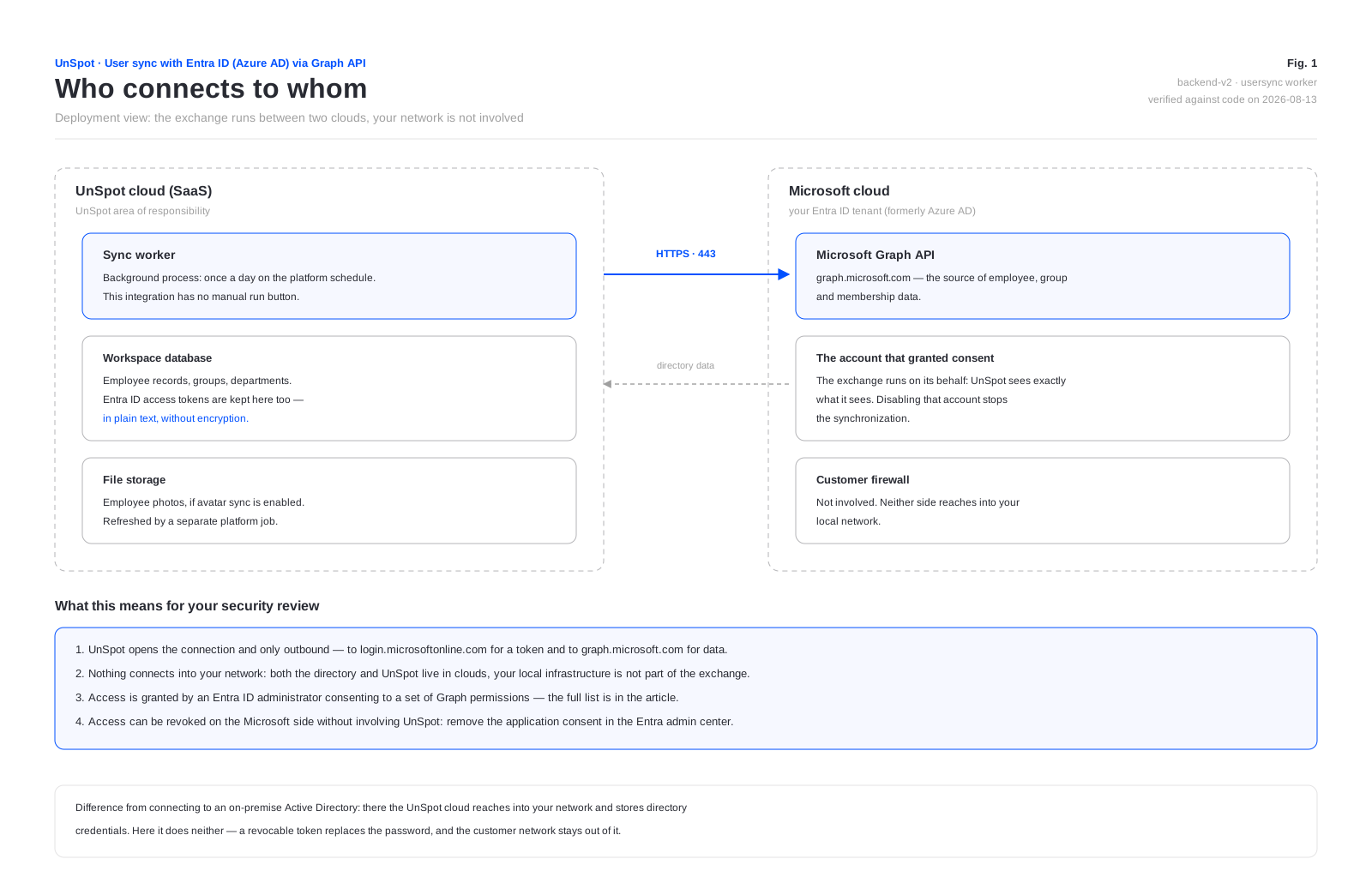
The key difference from connecting to an on-premise Active Directory is that the exchange runs between two clouds. UnSpot never reaches into your local network, no inbound firewall rules are needed, and no directory credentials are stored on the UnSpot side — a revocable token replaces the password.
Only one synchronization method can be connected to a workspace at a time: Entra ID, Google Workspace, AD LDAP or OpenLDAP. SCIM provisioning is the exception — it lives separately and can technically run alongside this one. Turning both on is not a good idea: the directory would then have two sources of truth.
Which permissions are requested
When connecting, UnSpot requests eight delegated permissions from Microsoft Entra ID. They are delegated, which means they act on behalf of the account that authorised them and within its own rights, not on behalf of an application.
| Graph permission | What it grants |
|---|---|
User.Read | Reads the profile of the authorising account itself |
User.Read.All | Reads the profiles of every directory user — the basis for transferring records |
Directory.Read.All | Reads directory objects |
Directory.AccessAsUser.All | Accesses the directory on behalf of the signed-in user |
Group.Read.All | Reads directory groups |
GroupMember.Read.All | Reads group membership |
Member.Read.Hidden | Reads the membership of groups with hidden membership |
offline_access | Issues a refresh token so synchronization continues without the administrator signing in again |
The .All permissions and Directory.AccessAsUser.All require administrator consent in Entra ID. UnSpot neither forces that consent nor checks which permissions were actually granted: with an incomplete set the connection still succeeds and the synchronization fails later with an access error. Worth knowing when granting — consent to the whole set at once.
The exchange runs on behalf of the account that granted consent, so UnSpot sees exactly what that account sees. If it is disabled or its password changes, the synchronization stops and the card reports that the account is not valid and asks you to reconnect it or use another one.
How one cycle runs
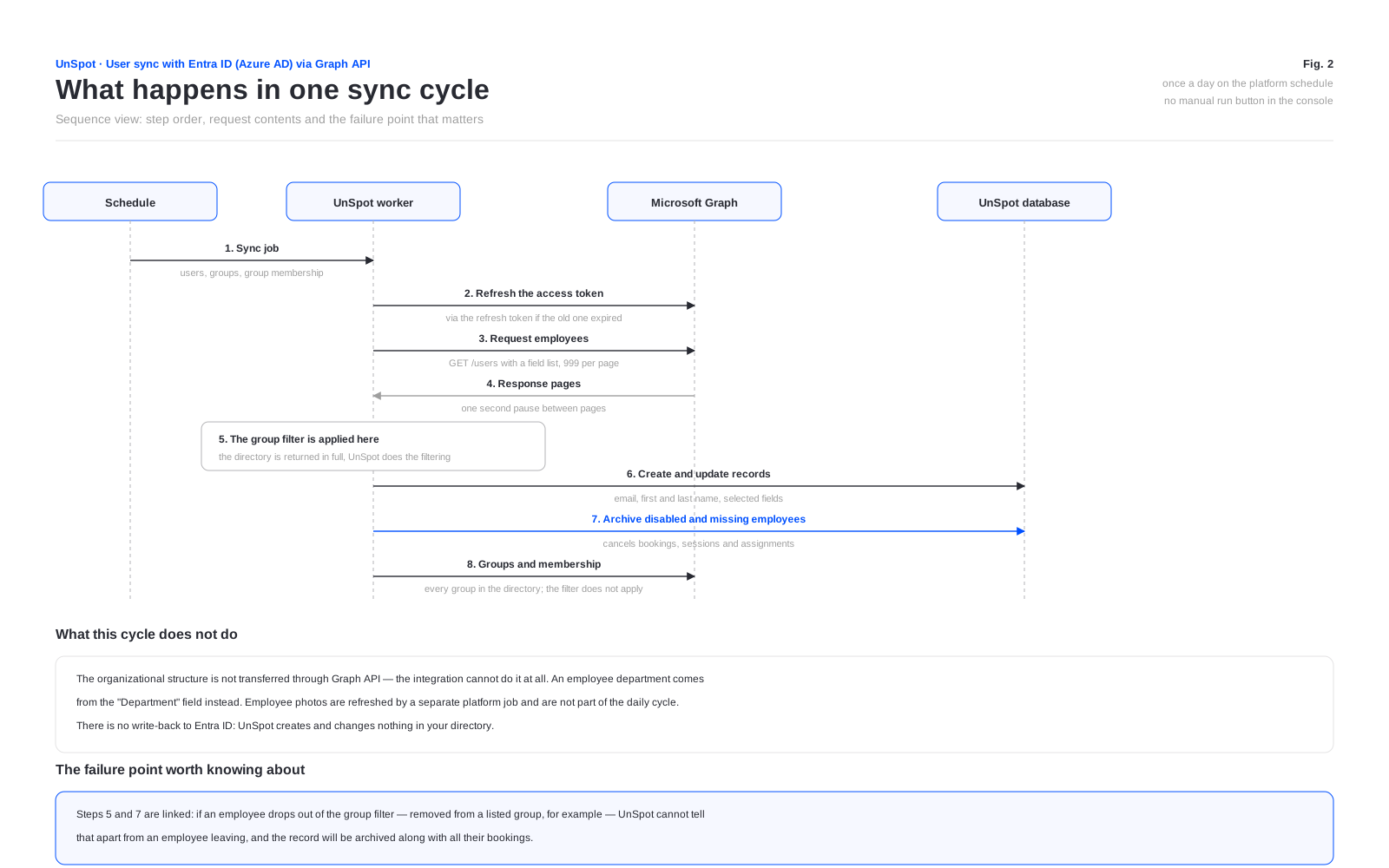
Automatic synchronization runs once a day on the platform schedule. This integration has no manual run button in the console — that exists only for connections to a local directory; a service API call POST /user-sync/sync (the Integrations Administrator role) starts a full cycle. The exchange additionally starts right after connecting, after fields are added to the set and after the group filter is changed; clearing a checkbox does not start an unscheduled exchange.
Within a cycle UnSpot reads the directory page by page, 999 records at a time, with a one-second pause between pages. There is no separate handling of Microsoft throttling: if Graph refuses because a rate limit was exceeded, the pass ends with an error and repeats in the next cycle. A sense of scale: a page costs a one-second pause plus the request itself, so a directory of several thousand accounts is read in minutes.
What is sent to UnSpot
The administrator picks the field set with the checkboxes in the Synchronization data block. Email address, first name and last name are always transferred; the rest only when selected.
| Data | Microsoft Graph property | When it is sent | What appears in UnSpot |
|---|---|---|---|
| Email address | userPrincipalName | always | The employee login. The mail property is never requested, so the UPN is what reaches UnSpot — a visible difference for tenants with addresses like …@company.onmicrosoft.com |
| First name | givenName, otherwise the first part of displayName, otherwise the part of the address before @ | always | First name in the employee record |
| Last name | surname, otherwise the remainder of displayName, otherwise the address domain | always | Last name in the employee record |
| Record identifier | id (GUID) | always | A service field: the external identifier of the record |
| Enabled flag | accountEnabled | always | Not written to the record. Used as a marker: an account disabled in the directory is archived in UnSpot |
| Department | department | when Department is selected | Not the Department field of the record but a node of the organizational structure. A / in the value creates nested departments |
| Position | jobTitle | when Position is selected | Position in the record. Values longer than 128 characters are truncated |
| Phone | mobilePhone | when Phone is selected | Phone in the record. Business phones are not requested |
| Manager | manager to userPrincipalName | when Manager is selected | Manager in the record — only if their own record already exists in UnSpot and is not archived |
| Photo | the profile photo, 240 by 240 | when User profile picture is selected | The employee avatar. Sent by a separate platform job, not in the main cycle |
| Groups and membership | id, displayName, onPremisesDomainName and members | when Groups is selected | UnSpot groups. The on-premise domain is prefixed to the name when the group has one |
In terms of personal data, what leaves the directory is: last and first name, work email address, mobile phone number, position, department, employee photo and the email address of the manager — and only those of them that are selected.
A separate note on the badge number: the checkbox exists in the field list and in the product, but this integration sends no value for it. Selecting it will not fill the badge number in — it will clear it.
The selection does not distinguish members from guests: B2B guest accounts are transferred alongside employees, and their sign-in name becomes a UPN like name_domain#EXT#@tenant.onmicrosoft.com. If guests should not reach UnSpot, exclude them with the group filter.
What is not sent
- Passwords and password hashes. Graph does not expose them and UnSpot does not ask. The UnSpot sign-in password is generated randomly on the UnSpot side.
- Anything from UnSpot back into Entra ID. There is no write-back: UnSpot creates, changes and deletes nothing in your directory.
- Bookings, schedules and employee activity. Nothing goes out.
- The directory organizational structure. This integration cannot transfer it at all — the corresponding checkbox is rejected at the product level.
- Other profile properties: business phone, office, city and country, payroll number, licences, devices and sign-in logs are never requested.
Direction and initiator of the exchange
Every connection is initiated by the UnSpot cloud and every one of them is outbound. No firewall rules are needed on the customer side at all: both parties to the exchange live in clouds.
| What UnSpot does | Where the request goes |
|---|---|
| Obtains and refreshes the access token | login.microsoftonline.com |
| Reads users, groups and group membership | graph.microsoft.com |
| Reads employee photos | graph.microsoft.com, in a separate job |
A separate note on Microsoft change notifications. The product contains a subscription mechanism, which assumes Microsoft calls UnSpot itself. In the current version subscriptions are not created on connect, and incoming notifications trigger no synchronization — the exchange runs on the schedule only. For your review that means the integration requires no inbound calls from Microsoft to UnSpot.
Protocol and encryption
- The exchange runs over HTTPS on port 443, to
login.microsoftonline.comandgraph.microsoft.com. Both belong to Microsoft; UnSpot calls no other host as part of this integration. - Certificates are validated by the platform in the standard way; the application provides no setting to turn that off.
- Authorization follows OAuth 2.0, authorization code flow. The access token is sent in a Bearer header.
- Tokens are obtained through the common Microsoft entry point; the specific tenant is determined by the account that signs in.
Where tokens are stored
- The access token and the refresh token are stored in the workspace database in plain text. No encryption is applied to those fields — unlike the password for a local directory connection, which is encrypted.
- Tokens are never returned outward: no interface operation exposes them.
- The access token lifetime is set by Microsoft. When it expires, UnSpot refreshes it with the refresh token automatically, without the administrator.
- On a connection error the exception trace is written to the application log, and depending on the runtime settings the call arguments — token values among them — can end up in it. Those logs are available to the UnSpot operations team, not to the workspace administrator.
The compensating control on your side is to review the application consent in the Entra ID admin center periodically and revoke access when the contractor or the responsible administrator changes, rather than relying on token lifetime.
What is cached and what stays in UnSpot
| What | Where | How long it lives |
|---|---|---|
| The mapping “Entra ID identifier to UnSpot record” | a service table in the workspace database | while the synchronization is connected. Removed on disconnect and on reconnect |
| The mapping “group identifier to UnSpot group” | a service table | the same; when the Groups checkbox is cleared, the matches and the created groups stay in UnSpot and simply stop updating |
| The photo change marker | a service table | used to avoid downloading an unchanged photo again |
| The employee and group result of the current cycle | process memory only | until the job finishes; never written to disk |
There is no persistent cache of the directory result: every cycle reads Graph again. Disconnecting the synchronization does not delete employee records or the groups that were created — they stay in UnSpot, but the link to directory entries is cleared, and on a later reconnect employees are matched again by email address, groups — by name.
What happens when an employee drops out of the result
The mechanics are the same for every synchronization method, and they are worth going through before you connect. If an employee stops appearing in the result — deleted from the directory, account disabled (accountEnabled = false) or moved outside the group filter — the UnSpot record is archived:
- every booking made by the employee is cancelled;
- their access tokens and connected calendars are deleted, and active sign-ins stop working because the record is archived;
- calendars they connected are removed;
- locker cell bookings are released;
- the assigned desk and parking space are released;
- delegate rights on meeting rooms are revoked;
- the employee is removed from every group, team and favourites list;
- the record itself is not deleted — it is flagged as archived, and if the employee comes back the record is restored.
The practical consequence for the group filter: removing an employee from a group listed in the filter is indistinguishable, from the UnSpot side, from that employee leaving the company. When you change the membership of such groups in Entra ID, remember that it cancels bookings.
A note on groups: when the groups checkbox is on, UnSpot transfers every group in the directory — the group filter does not apply to them, it only narrows the set of employees. The directory owns group membership: employees added to such a group by hand are removed from it on the next cycle, and a group that disappears in Entra ID is deleted in UnSpot as well.
How to revoke access
- On the Microsoft side — remove the application consent in the Entra ID admin center, or disable the account that granted it. UnSpot is not involved: the next cycle ends with an access error and the connection is flagged as invalid.
- On the UnSpot side — the Disconnect button on the card. It stops the synchronization and clears the connection settings together with the tokens. Employee records are kept.
Note that disconnecting the integration in UnSpot does not revoke the consent granted on the Microsoft side — it stays until it is removed in Entra ID. If the goal is for UnSpot to lose access to the directory for certain, revoke it on the Microsoft side.
What to weigh during your review
- The customer network is not part of the exchange. The integration needs neither inbound rules nor access to your local network — its main advantage over a direct connection to an on-premise directory.
- A broad set of directory read permissions is granted, including the membership of groups with hidden membership, and it requires Entra ID administrator consent.
- Tokens are stored in the UnSpot database without encryption and can reach the application log on a connection error.
- Access is revoked on the Microsoft side, and that is the only way to stop it for certain.
- Changing the membership of filtered groups archives employees, cancelling their bookings and sessions.
- The employee address becomes
userPrincipalName, not themailproperty: if the two differ, the difference shows up in UnSpot.
How this differs from SCIM
| Graph API (this article) | SCIM 2.0 | |
|---|---|---|
| Who initiates the exchange | UnSpot pulls the data | Entra ID pushes the data |
| Where the rules live | in UnSpot: the field set and the group filter | in Entra ID: user and group assignment, attribute mapping, sync scope |
| What is handed over | consent to Graph permissions | an UnSpot secret token |
| Organizational structure | not transferred | transferred |
| Setup on the Microsoft side | none | an enterprise application and provisioning |
| Works with other providers | no, Entra ID only | yes — Okta, OneLogin and any SCIM 2.0 |
Graph API is quicker to set up. SCIM keeps rule management in your own directory and works the same way with any other identity provider. Pick one method rather than both, or the directory ends up with two sources of truth.
