
User sync with Google Workspace: how it works
If your company uses Google Workspace, UnSpot can create and update employee records from the organization directory. This article explains how the exchange works: who initiates it, which permissions are granted on connection, what leaves the directory for UnSpot and where the access tokens are stored. It is written for the information security team reviewing the integration. For connection and configuration steps, see Set up user sync with Google Workspace.
What this synchronization does
The synchronization is one-way: data moves from Google Workspace into UnSpot, and changes made in UnSpot are never written back. You connect it in Manage > Integrations > Synchronisations, the Google Workspace card. The roles that may configure integrations are Super Administrator and Integrations Administrator.
It is enough to authorise a Google account with access to the organization directory once — usually a Workspace super administrator. From then on UnSpot calls the directory on its behalf.
What sets this method apart: of all the cloud directory connections, only Google Workspace transfers the organizational structure into UnSpot. The flip side is that it has no result filter: the whole organization directory is synchronized and cannot be narrowed to a subset of employees. And it does not transfer Workspace groups at all.
Who connects to whom
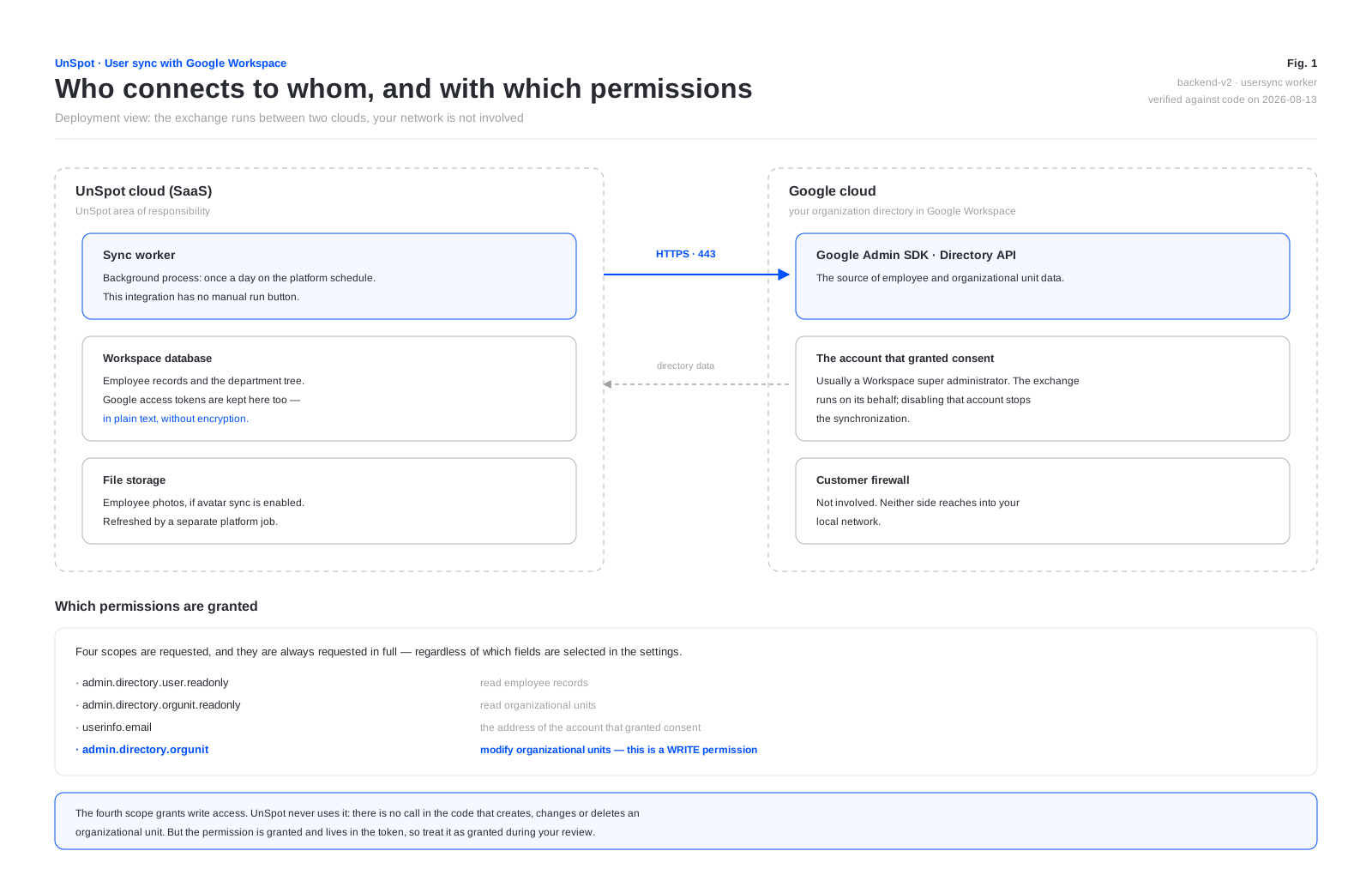
The exchange runs between two clouds. UnSpot never reaches into your local network, no inbound firewall rules are needed, and no directory credentials are stored on the UnSpot side — a revocable token replaces the password.
Only one synchronization method can be connected to a workspace at a time: Google Workspace, Entra ID, AD LDAP or OpenLDAP. SCIM provisioning is the exception — it lives separately and can technically run alongside this one.
Which permissions are granted
When connecting, UnSpot requests four OAuth scopes. An important detail: they are always requested in full, regardless of which fields the administrator selected in the synchronization settings.
| Scope | What it grants | Type |
|---|---|---|
admin.directory.user.readonly | Reads directory employee records | read only |
admin.directory.orgunit.readonly | Reads organizational units | read only |
userinfo.email | The address of the account that granted consent | read only |
admin.directory.orgunit | Creates, changes and deletes organizational units | write |
The fourth scope grants write access, and that needs saying plainly. There is no call in the UnSpot code that creates, changes or deletes an organizational unit in Google Workspace: only read operations are used. But the permission is granted together with the rest and lives in the token, so treat it during your review as granted rather than unused. The compensating control is to review the application permissions in the Google admin console periodically and revoke access when the responsible administrator changes.
A service account with domain-wide delegation is not used: access is granted by a live administrator consenting through OAuth 2.0. There is no separate “extended permission set” for the organizational structure — all four scopes are requested identically, and on connection UnSpot checks that Google returned all of them and refuses if the set is trimmed.
How one cycle runs
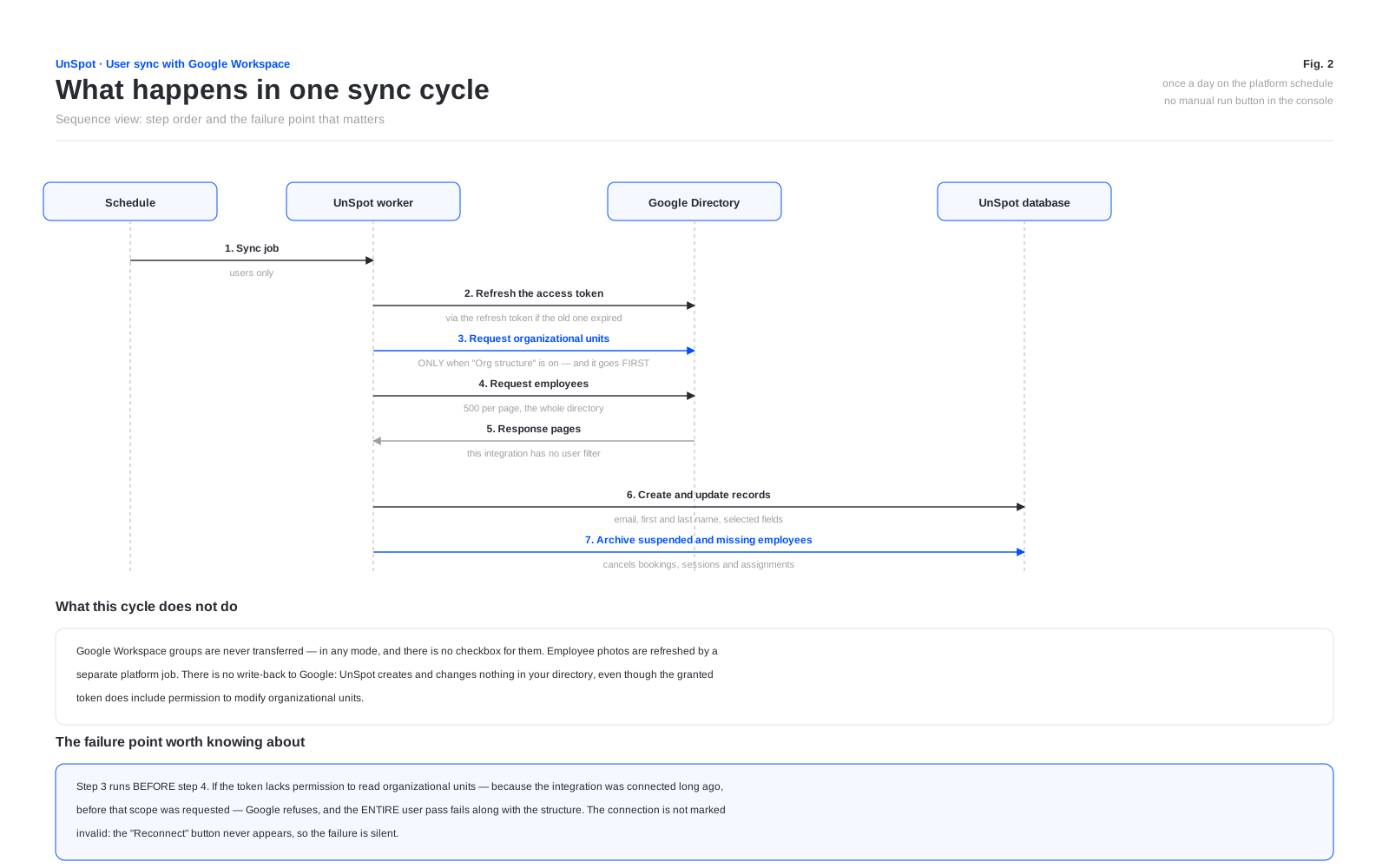
Automatic synchronization runs once a day on the platform schedule and covers employees; the department tree is not part of the daily cycle — it is imported once, at the moment the Organizational structure checkbox is switched on. This integration has no manual run button in the console; a service API call POST /user-sync/sync (the Integrations Administrator role) exists. The exchange additionally starts right after connecting and after fields are added to the set; clearing a checkbox takes effect from the next cycle.
The directory is read page by page, 500 records at a time. There is no handling of Google rate limits: if Google refuses because a limit was exceeded, the pass ends with an error and repeats in the next cycle. A sense of scale: a page is 500 records, so a directory of several thousand accounts is read in minutes.
The step order within a cycle matters. When the organizational structure checkbox is on, UnSpot reads the units first and the employees second. If the token lacks permission to read units — because the integration was connected long ago, before that scope was requested — Google refuses, and the entire user pass fails, not just the structure transfer. The connection is not flagged as invalid: the Reconnect button never appears and the failure is silent. The fix is to reconnect the integration and grant consent again.
What is sent to UnSpot
The administrator picks the field set with the checkboxes in the Synchronization data block. Email address, first name and last name are always transferred; the rest only when selected.
| Data | Google Directory field | When it is sent | What appears in UnSpot |
|---|---|---|---|
| Email address | the first address in the emails list | always | The employee login. It is the first address in the list rather than the one marked primary — if an employee has several addresses, the value may differ from what you expect |
| First name | name.givenName | always | First name in the record. If the field is empty, the part of the email address before the at sign is used |
| Last name | name.familyName | always | Last name in the record. If the field is empty, the domain name without the top-level domain is used |
| Record identifier | id | always | A service field: the external identifier of the record. While the link lives, matching rests on it — changing the email address in Workspace creates no duplicate, the address in UnSpot simply updates |
| Suspended flag | suspended | always | Not written to the record. Used as a marker: an account suspended in Workspace is archived in UnSpot |
| Department | organizations[0].department | when Department is selected | The employee department. Mutually exclusive with transferring the organizational structure |
| Organizational structure | orgUnitPath and the directory unit tree | once — at the moment the Organizational structure checkbox is switched on | The UnSpot department tree and the employee position in it; the daily cycle only re-attaches employees to existing units — new Workspace units do not appear on their own. The head of a unit is not transferred |
| Position | organizations[0].title | when Position is selected | Position in the record. Values longer than 128 characters are truncated |
| Phone | phones[0].value | when Phone is selected | Phone in the record — the first number in the list |
| Manager | relations[0].value — the first entry of the Relations list regardless of its type: make sure the Manager relation comes first | when Manager is selected | Manager in the record — only if their own record already exists in UnSpot and is neither archived nor deactivated |
| Photo | the employee profile photo | when User profile picture is selected | The employee avatar. Sent by a separate platform job, not in the main cycle |
In terms of personal data, what leaves the directory is: last and first name, work email address, phone number, position, department, position in the organizational structure, employee photo and the email address of the manager — and only those of them that are selected.
What is not sent
- Passwords and password hashes. UnSpot requests no scope that touches account security data. The UnSpot sign-in password is generated randomly on the UnSpot side.
- Mail, calendar, files and any other Google service. The granted scopes cover the directory only: neither Gmail, nor Google Calendar, nor Drive is included. UnSpot calendar connections are a separate integration with separate consent.
- Google Workspace groups. They are never transferred: no group read scope is requested, and group transfer is disabled for this method at the product level.
- Custom directory schemas. Additional fields created by the Workspace administrator are never requested.
- Anything from UnSpot back into Google. There is no write-back.
- Bookings, schedules and employee activity. Nothing goes out.
One more: the archived account state in Workspace is not processed — only “suspended” is. An employee archived in Workspace stays active in UnSpot.
Direction and initiator of the exchange
Every connection is initiated by the UnSpot cloud and every one of them is outbound. No firewall rules are needed on the customer side: both parties to the exchange live in clouds.
| What UnSpot does | Where the request goes |
|---|---|
| Obtains and refreshes the access token | the Google authorization service |
| Reads employees and organizational units | Google Admin SDK, Directory API |
| Reads employee photos | the same interface, in a separate job |
The product contains a subscription mechanism in which Google calls UnSpot itself. In the current version the subscription is not created on connect, and incoming notifications trigger no synchronization — the exchange runs on the schedule only. For your review that means the integration requires no inbound calls from Google to UnSpot.
Protocol and encryption
- The exchange runs over HTTPS on port 443 to Google interfaces. UnSpot calls no other host as part of this integration.
- Certificates are validated by the platform in the standard way; the application provides no setting to turn that off.
- Authorization follows OAuth 2.0, authorization code flow with offline access: a refresh token is issued so the synchronization continues without the administrator signing in again.
One detail worth knowing during a review: when the connection starts, the UnSpot administrator session token is passed as a query parameter in the address. Addresses with parameters end up in intermediate logs and in browser history. The practical control is to connect from the administrator’s own workstation rather than a shared or demo machine.
Where tokens are stored
- The access token and the refresh token are stored in the workspace database in plain text. No encryption is applied to those fields — unlike the password for a local directory connection, which is encrypted.
- Tokens are never returned outward: no interface operation exposes them and they are not written to the application log.
- The access token lifetime is set by Google. When it expires UnSpot refreshes it with the refresh token automatically. Refreshing does not widen the permission set: it stays as it was at consent time.
What is cached and what stays in UnSpot
| What | Where | How long it lives |
|---|---|---|
| The mapping “Google identifier to UnSpot record” | a service table in the workspace database | while the synchronization is connected. Removed on disconnect and on reconnect |
| The photo change marker | a service table | used to avoid downloading an unchanged photo again |
| The employee result of the current cycle | process memory only | until the job finishes; never written to disk |
There is no persistent cache of the directory result: every cycle reads Google again, and the client cache is cleared on every call. Disconnecting the synchronization does not delete employee records — they stay in UnSpot, but the link to directory entries is cleared, and on a later reconnect employees are matched again by email address.
What happens when an employee disappears from the directory
The mechanics are the same for every synchronization method. If an employee is deleted from the directory or their account is suspended, the UnSpot record is archived:
- every booking made by the employee is cancelled;
- their access tokens and connected calendars are deleted, and active sign-ins stop working because the record is archived;
- calendars they connected are removed;
- locker cell bookings are released;
- the assigned desk and parking space are released;
- delegate rights on meeting rooms are revoked;
- the employee is removed from every group, team and favourites list;
- the record itself is not deleted — it is flagged as archived, and if the employee comes back the record is restored.
Since this integration has no result filter, you cannot lose an employee by accidentally narrowing one — unlike the other methods. The reverse is also true: every account in the directory reaches UnSpot, service and shared mailboxes included, if they exist as Workspace users.
How to revoke access
- On the Google side — revoke the application access in the Google Workspace admin console, or disable the account that granted consent. UnSpot is not involved: the next cycle ends with an access error and the connection is flagged as invalid.
- On the UnSpot side — the Disconnect button on the card. It stops the synchronization and clears the connection settings together with the tokens. Employee records are kept.
Disconnecting the integration in UnSpot does not revoke the consent granted on the Google side. If the goal is for UnSpot to lose access to the directory for certain, revoke it in the Google admin console.
What to weigh during your review
- The customer network is not part of the exchange — the integration needs neither inbound rules nor access to your local network.
- Every domain of the Workspace organization is synchronized. The selection runs over the organization (customer) of the administrator who granted consent: accounts from secondary and child domains are transferred too, not only the administrator domain.
- The granted permissions include the right to modify Google Workspace organizational units. The code never uses it, but it is granted.
- Tokens are stored in the UnSpot database without encryption.
- The whole organization directory is synchronized — this integration has no result filter.
- Workspace groups are never transferred — if you counted on using them in UnSpot permissions, this method will not do it.
- The administrator session token is passed in the address when the connection starts.
- Suspending an account archives the employee, cancelling their bookings and sessions; the archived state in Workspace is not processed.
- Access is revoked on the Google side, and that is the only way to stop it for certain.
