05-11-2026
A parking map that shows where the chargers are
An employee with an electric car books a space at random and only finds out on arrival that there is no charger nearby. A colleague on a motorbike gets a full-size car space when a corner by the wall would do. And the accessible space looks exactly like its neighbours on the plan, so it ends up booked by someone who does not need it. The reason is simple: every parking space on the office map looked the same.
Four types of space instead of one
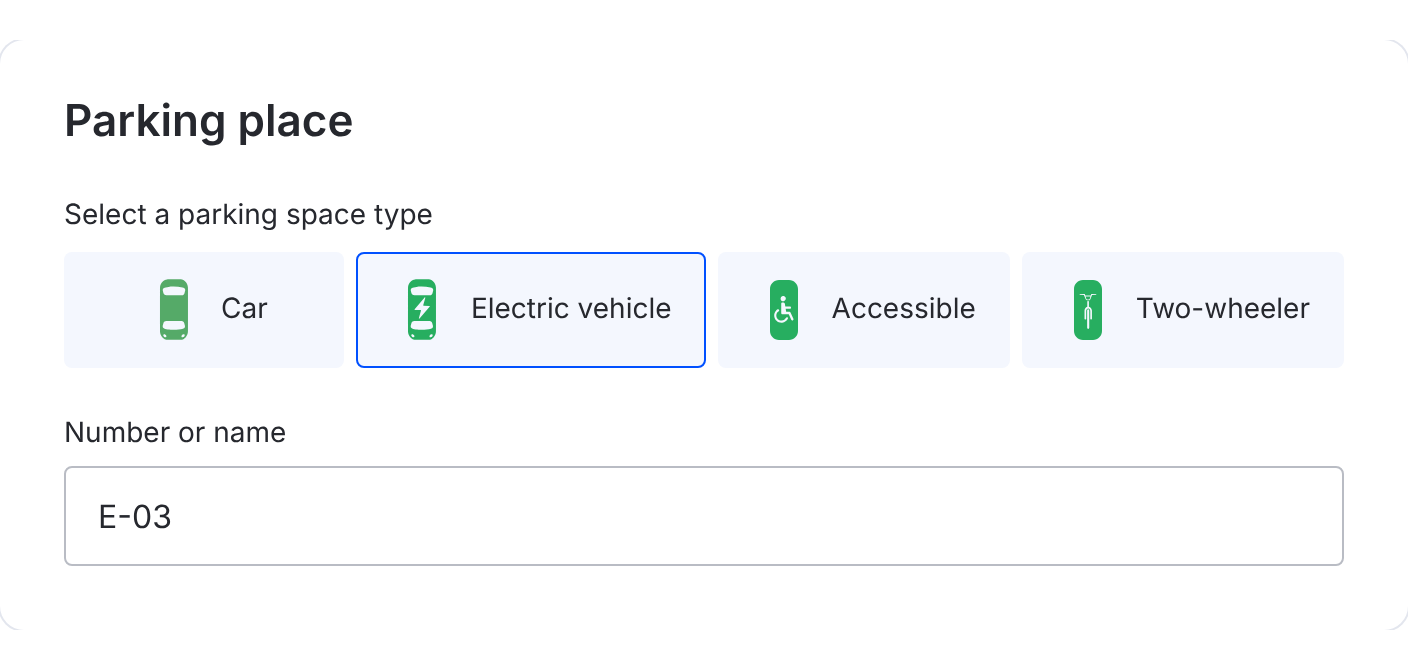
When adding a parking space in the new map editor, the administrator now picks its type: Car, Electric vehicle, Accessible or Two-wheeler. Each type has its own icon. The type can be changed for spaces that are already on the map, so there is no need to redraw the layout. Existing spaces are kept and shown as regular car spaces.
Employees see where they are going
The chosen icon appears on the office map where employees book parking; tooltips, labels and status colours stay the same. EV drivers spot the charging spaces at once, riders find the place for two-wheelers.
The same icon is drawn on the floor plan in parking emails: when a booking is created, when it starts, when check-in opens and when a space is assigned to an employee. People open the email in the morning and know which space is waiting for them.
Why it matters
Charging spaces and accessible spaces are the scarcest part of any car park. When they are visible on the map, they are less likely to go to the wrong people, and those who really need them do not have to ask security or the team chat. Space types work together with the usual access settings: for example, charging spaces can be made bookable only for selected user groups via Available for bookings for.
How to set it up
Open the parking map in the new map editor, add or select a space and choose the type under Select a parking space type. The type is set for each space individually, so the map can match the markings on the ground exactly. Once the map is published, employees will see the new icons.